Python provides several assignment operators that combine arithmetic, bitwise, and other operations with assignment. Understanding these operators is essential for writing clean and efficient Python programs.
Table of Contents
What are Assignment Operators?
An assignment operator is a symbol that assigns a value to a variable. The most basic assignment operator is the equal sign (=), which stores a value in a variable. Python also provides compound assignment operators that perform an operation and assignment in a single step.Syntax:
Example:variable = expression
Here, the value 10 is assigned to the variable x.x = 10
Python offers a whole toolkit of assignment operators designed to make your code cleaner, shorter, and smarter. Let's break them down.
Types of Assignment Operators
Below are the different types of the assignment operators in Python: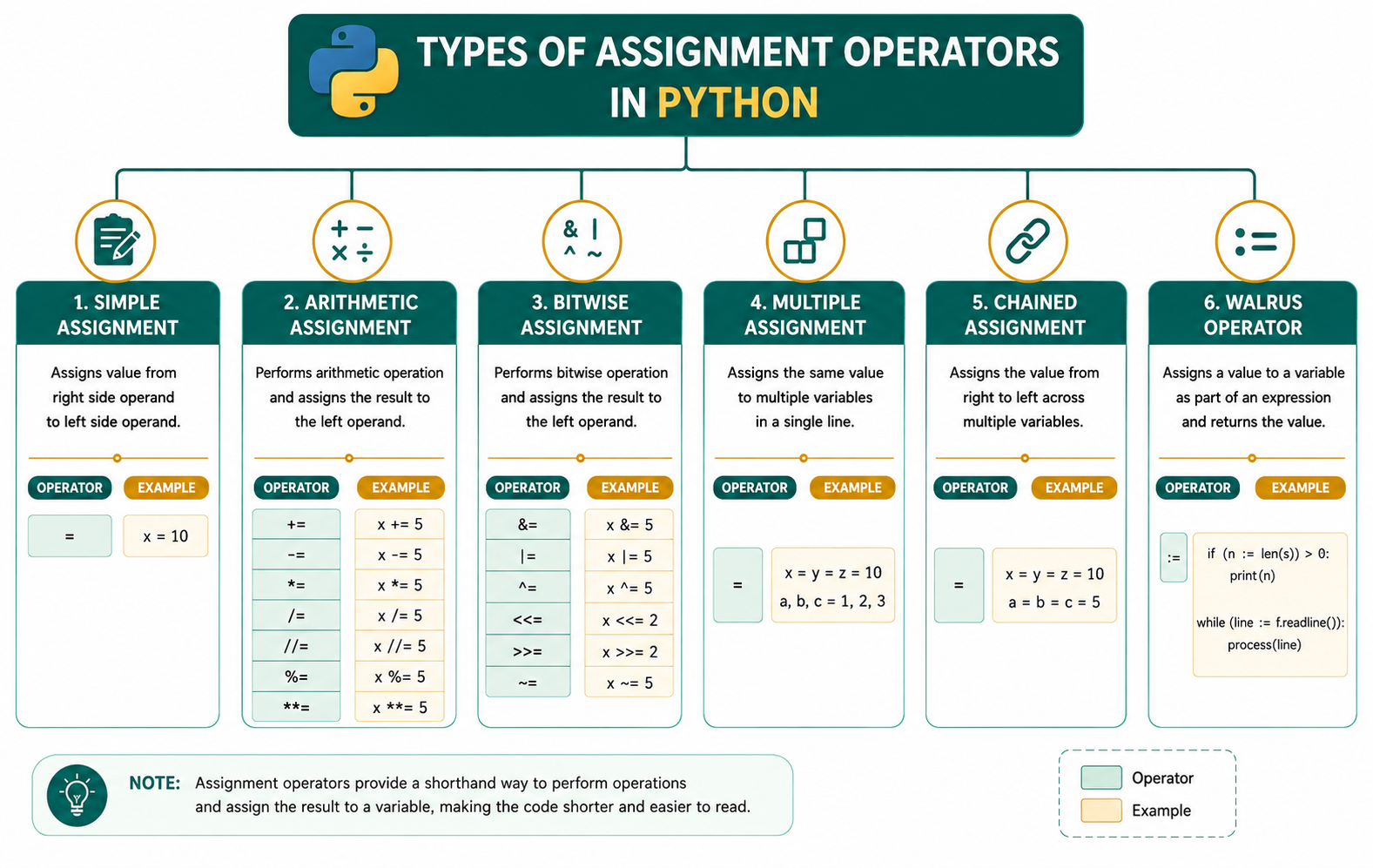
1. Simple Assignment Operator: It assigns the value on the right-hand side to the variable name on the left.
Example:
# Python program to show the working of
# simple assignment operator
# Assigning values to variables

# Assigning a simple integer
number = 100

# Assigning a string
name = "Python"

print(number)
print(name)
Output:
Explanation:100
Python
- number = 100 stores the integer value 100 in the variable number.
- name = "Python" stores the string "Python" in the variable name.
2. Arithmetic Assignment Operators: Writing x = x + 5 is perfectly fine, but it can feel a bit repetitive. Python provides augmented assignment operators to combine an arithmetic or bitwise operation with an assignment in one elegant step.The variable on the left must always be a valid identifier (a name), not a literal value. For example, 10 = x will throw a SyntaxError.
Here is a quick-reference guide to the most common augmented arithmetic operators:
| Operator | Name | Example | Equivalent To |
|---|---|---|---|
| += | Add and Assign | x += y | x = x + y |
| -= | Subtract and Assign | x -= y | x = x - y |
| *= | Multiply and Assign | x *= y | x = x * y |
| /= | Divide and Assign | x /= y | x = x / y |
| //= | Floor Divide and Assign | x //= y | x = x // y |
| %= | Modulo and Assign | x %= y | x = x % y |
| **= | Exponent and Assign | x **= y | x = x ** y |
Example:
# Program to demonstrate Arithmetic Assignment
# Operators in Python

# Initialize a variable
num = 20
print("Initial value of num =", num)

# += (Addition Assignment Operator)
# Equivalent to: num = num + 10
num += 10
print("After num += 10 :", num)

# -= (Subtraction Assignment Operator)
# Equivalent to: num = num - 5
num -= 5
print("After num -= 5 :", num)

# *= (Multiplication Assignment Operator)
# Equivalent to: num = num * 2
num *= 2
print("After num *= 2 :", num)

# /= (Division Assignment Operator)
# Equivalent to: num = num / 5
num /= 5
print("After num /= 5 :", num)

# %= (Modulus Assignment Operator)
# Equivalent to: num = num % 3
num %= 3
print("After num %= 3 :", num)

# Reset the variable for further operations
num = 10
print("\nReset value of num =", num)

# **= (Exponentiation Assignment Operator)
# Equivalent to: num = num ** 3
num **= 3
print("After num **= 3 :", num)

# Reset the variable again
num = 17
print("\nReset value of num =", num)

# //= (Floor Division Assignment Operator)
# Equivalent to: num = num // 4
num //= 4
print("After num //= 4 :", num)
Output:
Explanation:Initial value of num = 20
After num += 10 : 30
After num -= 5 : 25
After num *= 2 : 50
After num /= 5 : 10.0
After num %= 3 : 1.0
Reset value of num = 10
After num **= 3 : 1000
Reset value of num = 17
After num //= 4 : 4
- A variable named num is initialized by num = 20
- num += 10 (Addition Assignment Operator) adds the right-side value to the variable and assigns the result back
- num -= 5 (Subtraction Assignment Operator) subtracts the right-side value from the variable and assigns the result back
- num *= 2 (Multiplication Assignment Operator) multiplies the variable by the right-side value and assigns the result back
- num /= 5 (Division Assignment Operator) divides the variable by the right-side value and assigns the result back
- num %= 3 (Modulus Assignment Operator) finds the remainder and assigns it back to the variable
- num **= 3 (Exponentiation Assignment Operator) raises the variable to the power of the right-side value
- num //= 4 (Floor Division Assignment Operator) performs floor division and assigns the result back
Here is a quick-reference guide to the most common augmented arithmetic operators:
| Operator | Name | Example | Equivalent To |
|---|---|---|---|
| &= | Bitwise AND and Assign | x &= y | x = x & y |
| |= | Bitwise OR and Assign | x |= y | x = x | y |
| ^= | Bitwise XOR and Assign | x ^= y | x = x ^ y |
| >>= | Right Shift and Assign | x = y | x = x y |
| <<= | Left Shift and Assign | x= y | x = x y |
Example:
# Program to demonstrate Bitwise Assignment
# Operators in Python

# Initialize a variable
# Binary representation of 12 is 1100
num = 12
print("Initial value of num =", num)

# &= (Bitwise AND Assignment Operator)
# Equivalent to: num = num & 10
num &= 10
print("After num &= 10 :", num)

# |= (Bitwise OR Assignment Operator)
# Equivalent to: num = num | 3
num |= 3
print("After num |= 3 :", num)

# ^= (Bitwise XOR Assignment Operator)
# Equivalent to: num = num ^ 5
num ^= 5
print("After num ^= 5 :", num)

# <<= (Left Shift Assignment Operator)
# Equivalent to: num = num << 2
num = 2
print("After num = 2 :", num)

# = (Right Shift Assignment Operator)
# Equivalent to: num = num >> 3
num >>= 3
print("After num = 3 :", num)
Output:
Explanation:Initial value of num = 12
After num &= 10 : 8
After num |= 3 : 11
After num ^= 5 : 14
After num <<= 2 : 56
After num >>= 3 : 7
- A variable named num is initialized to 12
- num &= 10 (Bitwise AND Assignment Operator) performs a bitwise AND operation, 1100 & 1010 = 1000 (8), and assigns the result back.
- num |= 3 (Bitwise OR Assignment Operator) performs bitwise OR operation, 1000 | 0011 = 1011 (11), and assigns the result back
- num ^= 5 (Bitwise XOR Assignment Operator) performs a bitwise XOR operation, 1011 ^ 0101 = 1110 (14), and assigns the result back
- num <<= 2(Left Shift Assignment Operator) shifts the bits of the number to the left by the specified positions. Here, 1110 << 2 = 111000 (56)
- num >>= 3 (Right Shift Assignment Operator) shifts the bits of the number to the right by the specified positions. Here, 111000 >> 3 = 111 (7)
Example:
# Program to demonstrate multiple assignments
# in one line in Python
# Assigning different values to multiple variables
a, b, c = 10, 20, 30

print(a)
print(b)
print(c)
Output:
Explanation:10
20
30
Each variable receives the corresponding value from the right-hand side. Therefore, a = 10, b = 20, c = 30.
5. Chained Assignment: The same value can be assigned to multiple variables simultaneously in Python.
Example:
# Program to demonstrate chained assignments in
# one line in Python
# Assigning the same value to multiple variables
x = y = z = 100

print(x)
print(y)
print(z)
Output:
Explanation:100
100
100
All three variables x, y, and z store the same value 100.
6. The Walrus Operator (:=): Introduced in Python 3.8, the Assignment Expression operator - affectionately known as the Walrus Operator (because := looks like a walrus with tusks).
Unlike the standard =, which only performs an assignment, the walrus operator assigns a value to a variable and returns that value at the same time. This allows you to assign variables inside of expressions, like if statements or while loops.
The walrus operator helps write more concise and readable code by avoiding repeated calculations or separate assignment statements.
Example:
# Program to demonstrate the Walrus Operator
# (:=) in Python

# Example 1: Assigning and printing a value
# in a single expression
print("Example 1: Basic assignment using walrus operator")

# The value 25 is assigned to the variable 'num' and
# then printed immediately
print(num := 25)

# Displaying the value stored in num
print("Value of num =", num)


# Example 2: Using the walrus operator in an
# if statement
print("\nExample 2: Using walrus operator in an if statement")

# The length of the string is assigned to 'length' and
# checked in the same statement
if (length := len("Python Programming"))  10:
    print("Length of the string is:", length)


# Example 3: Using the walrus operator in a while loop
print("\nExample 3: Using walrus operator in a while loop")

# Initialize a counter
count = 0

# Assign the incremented value to 'count' and check the
# condition simultaneously
while (count := count + 1) = 5:
    print("Count =", count)


# Example 4: Using the walrus operator with a list
print("\nExample 4: Using walrus operator with a list")

numbers = [10, 20, 30, 40, 50]

# Assign the sum of the list to 'total' and print it
# in the same statement
print("Total =", (total := sum(numbers)))

# Display the stored value
print("Stored total =", total)
Output:
Explanation:Example 1: Basic assignment using walrus operator
25
Value of num = 25
Example 2: Using walrus operator in an if statement
Length of the string is: 18
Example 3: Using walrus operator in a while loop
Count = 1
Count = 2
Count = 3
Count = 4
Count = 5
Example 4: Using walrus operator with a list
Total = 150
Stored total = 150
- In Example 1, the walrus operator assigns the value 25 to num and prints it in a single statement.
- In Example 2, it calculates the length of a string, stores it in length, and checks the condition simultaneously.
- In Example 3, it updates and checks the loop counter in one expression.
- In Example 4, it stores the result of sum(numbers) in total while printing it.
Conclusion
Assignment operators are fundamental components of Python programming. They allow programmers to assign values, perform calculations, and update variables efficiently. From the basic assignment operator (=) to compound operators like +=, *=, and bitwise assignment operators, these tools help write concise, readable, and maintainable code. Mastering assignment operators is essential for becoming proficient in Python programming.Frequently Asked Questions
1. What is an assignment operator in Python?2. What is the difference between = and +=?An assignment operator is a symbol used to assign values to variables. It can also combine operations with assignment.
3. What is multiple assignment in Python?The = operator assigns a value, while += adds a value to the existing variable and stores the result.
4. Can I use assignment operators inside a print() function?Multiple assignment allows assigning multiple values to multiple variables in a single statement.
5. What happens during a multiple assignment like x, y = y, x?With the standard assignment operator (=), No. Doing so will raise a TypeError because an assignment statement does not return a value.
However, you can do this using the Walrus Operator (:=), because assignment expressions return the value being assigned.
Python evaluates the entire right-hand side first (creating a temporary tuple of the values y and x in memory) and then unpacks those values into the variables on the left-hand side. This is why you can safely swap variables in a single line without overriding data or needing a temporary temp variable.

0 Comments