Ever taken an AI-generated function from the editor and proceeded to rewrite half of it right away? Not because the code was technically incorrect, but simply because it was not written the way you like it to be done, which meant wrong names, useless comments, and a formatting style incompatible with anything else in the code base. It turns out, the difference between “technically correct” and “fits our team’s conventions” is precisely the problem that code fine-tuning solves. Rather than negotiating the code-writing style anew at each interaction with the coding assistant, code fine-tuning allows you to encode your team’s preferences into the model directly. This article delves into the nitty-gritty of how it is done.
Table of Contents
What Does "Coding Style" Actually Mean to a Model?
While developers generally think of "style" in terms of indentation and bracket placement, there are often many other implicit choices embedded in code style, such as naming convention, verbosity of error-handling mechanism, use of a list comprehension vs. a for-loop, and structuring classes vs functions. None of this information is usually documented anywhere; it is encoded in thousands of tiny details spread throughout your codebase, and this is the very reason why a general-purpose model cannot learn it, but a fine-tuned model can do it.
These are the few parameters on which a certain model can be trained, incorporating the user's coding style:
- Naming Philosophy: Whether names are descriptive and verbose, or compact and functional, and how this decision is being maintained throughout the codebase.
- Structural Tendencies: Approaches to function length, class structure, and breaking up logic into parts.
- Error Handling: How exceptions are handled, logged, and propagated, and how defensive code is.
- Comments Frequency and Tone: Whether comments provide "whys" occasionally or describe everything, and whether the language used is formal.
- Language Idioms: Particular language constructs that a certain team prefers, such as comprehensions, the ternary operator, or particular built-in methods over others.
Why Regular Code Models Prove To Be Inefficient
Models that generate code out-of-the-box are trained on huge open-source code repositories; hence, they learn general coding styles, not the one specific to your development team. While being a good starting point, suggestions made by such systems need to be adapted for the project because sometimes they might suggest, for instance, using Java-style getters within a Python project or an unused test framework.
- Trained on General Code: Suggestions generated by the model reflect common practice rather than the specific style followed by your team.
- No Information About Coding Standards: The system does not know your coding standards and architecture.
- No Awareness with Project-Specific Code: Legacy code, special utilities, and coding style specific to the project are unknown to the model.
- Frequent Corrections Required: Suggestions often require manual corrections.
What Data Actually Teaches a Model Your Style
Training a model on code is not about giving the model a style guide to read; it is about demonstrating to it what it should learn. The best training dataset is your own repository of code: the actual functions and pull requests written by your developers, where certain coding styles have either been explicitly agreed upon or developed through habits. The better and more consistently such code exists, the quicker the model can figure out the implicit coding rules without having them written anywhere. Given below are a few examples of the data sources that can be used to teach a model the user's style.
- Your Repositories of Code: The most direct reflection of how your developers actually write code.
- Merged Pull Requests: Not only the final result of your team's work, but also the changes that happened during the process, often including explicit coding styles.
- Code Review Comments: Feedback provided by reviewers contains stylistic considerations that would be hidden from the model if there were only the final code available.
- Internal Style Guides and Configurations of Linters: Direct and explicit rules of coding that will strengthen implicit instructions from the raw code.
- Before And After Of The Same Code: An illustration of how your team considers "better code in our style".
Working on Fine-Tuning a Code Model
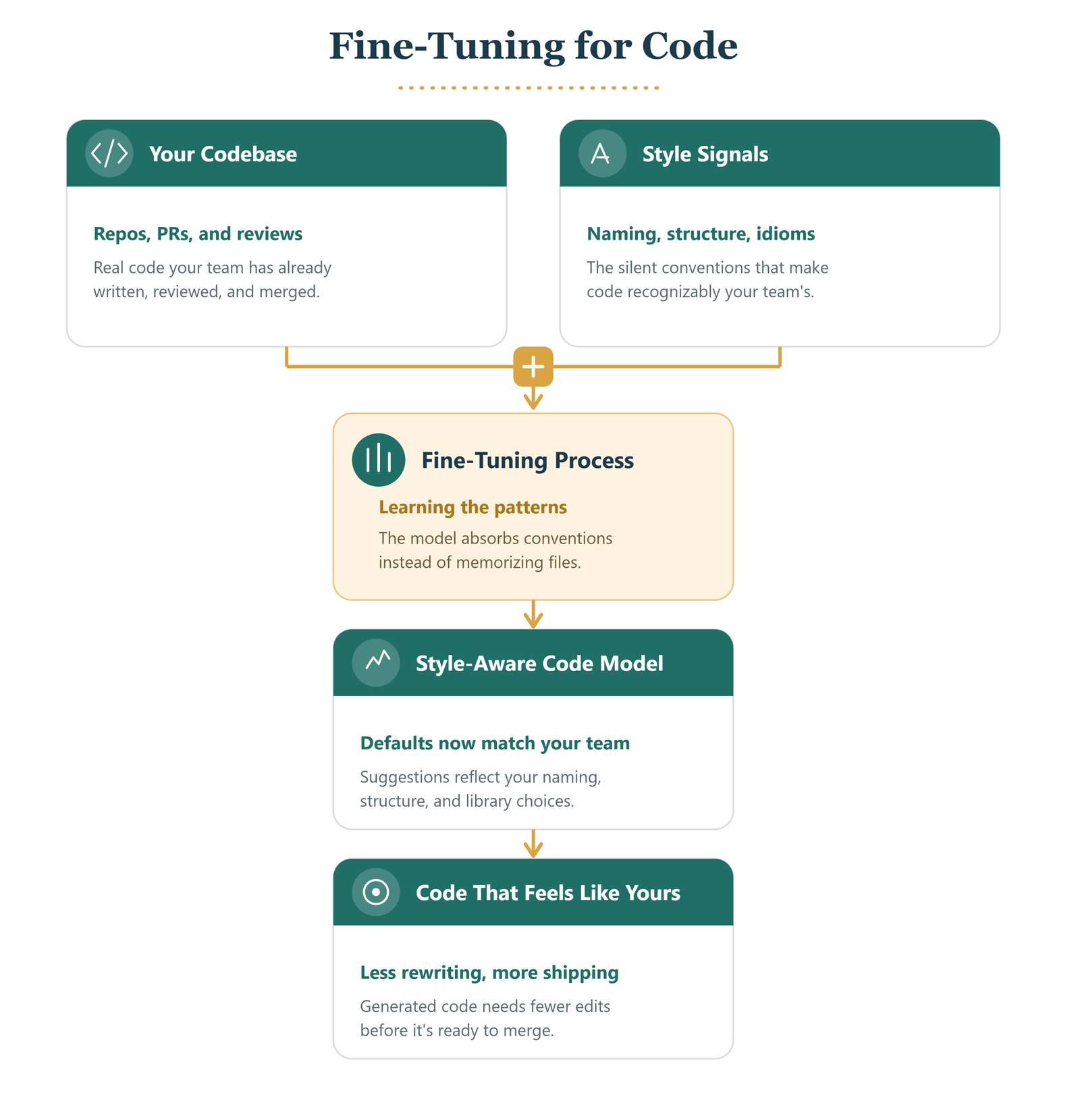
Technically, fine-tuning a code model is no different from fine-tuning any other language model, only in a completely different domain. It works on the basis of the pre-trained model that already knows programming languages, and then it gets trained on top of your carefully selected examples of code written in your style. It is worth noting that this training process will not lead to copying the code verbatim but to learning to recognize the patterns specific to your code. Here is how fine-tuning a code model can actually be done:
- From a Code-Savvy Base Model: Instead of starting from scratch, most people fine-tune a model that already knows programming languages.
- Curating a Representative Dataset: Samples of code are being cleaned up, duplicates are being removed, and only those examples are being kept that reflect the accepted practice today, not some outdated files.
- Formatting the Code for Training: The code is supplemented with prompts that show how exactly you write.
- Fine-Tuning the Model: Adjustments are being made to the parameters of the model gradually to shift its default output towards your code writing style.
- Validating On Actual Coding Tasks: Generated code is being tested on actual coding requests.
Steps to Teach a Model Your Coding Style
Having theoretical knowledge about fine-tuning is one thing, but making it work takes a rather pragmatic set of steps. Teams that do well almost always use a similar set of steps, even if their choice of tools varies. These are the steps involved in this process:
- Step 1: Auditing Codebase: Auditing the codebase is done for consistency. Prior to fine-tuning, first audit your codebase and determine what elements are up-to-date and adhere to the latest standards, and what is old and inconsistent.
- Step 2: Creating a Curated Dataset: Collect merged pull requests, approved modules, reviewed code, and eliminate any duplicates and dead code.
- Step 3: Adding Context to the Code: Add some sort of prompts, commit message, or task description next to each piece of code in order to provide context on when the code is supposed to be used.
- Step 4: Fine-Tuning Strategy Selection: Decide whether to fine-tune the whole model or opt for something more lightweight like LoRA, based on your computing capabilities and dataset size.
- Step 5: Training, Evaluation, and Ieration: Execute the fine-tuning procedure, verify code generation with real-world applications, take developer feedback, and then iterate on training until the results feel like your own development team wrote it.
The Multiple-Authors Problem
Here’s one thing that gets implicitly glossed over in discussions of code refinement: a codebase was never written by a single person, and “your team’s style” is actually the combined styles of dozens of individuals, one on top of another. Refining a model against the accumulated history of all of that leaves you with an averaged result, which may just as easily end up being a reflection of the most active contributor to the codebase rather than the actual style set. If left unchecked, that could leave you refining a model against the style of a single loud individual and calling it “the team’s style.” A few key factors that determine the final learning parameters in the model are:
- Commit Frequency Biases the Signals: The volume of a single productive author’s commits may completely overpower the training data without reflecting any common coding style.
- Review Power and Seniority: The role of seniority and review power cannot be underestimated. If the code has been approved by senior programmers, it is much more likely to reflect agreed standards than a non-reviewed personal contribution.
- Recency Must be Taken into Account: It is possible that some outdated commits do not represent the current style because conventions have changed over time.
- Team Style Must Outweigh Personal Style: Consistent patterns that are evident among several authors must be considered a stronger indicator of “team style” than a personal one.
- Curated Selection Outdoes Plain Collection: Collecting a selection of files that will serve as a model for the model must avoid giving a chance to any particular voice to dominate.
Regulating Framework and Library Preferences
Coding style can go beyond syntax, and the tooling used by a developer team is part of coding style too. In such cases, fine-tuning allows you to catch this information from the codebase, the model will know that your team uses a certain testing library, uses a certain state/data management pattern, has preferences about how API requests should be constructed, etc., without you having to specify it every single time. It is often at this point that fine-tuning shows one of the most evident benefits, since recommendations on the usage of a "wrong" library are one of the most frequent developer complaints.
Preferences that can be modified related to the library and framework are:
- Preferred Testing Frameworks: The model will prefer your team's testing library over the most popular one.
- State/Data Management Patterns: If your team consistently uses a certain set of libraries/patterns, it will show in recommendations.
- API/Networking Conventions: The way your team constructs requests and performs authentication and error handling is now the default.
- Awareness of Internal Packages: Your team's internal libraries/utilities become recognized by the fine-tuned model.
- Specific Versions of the Framework: The model now reflects your team's current framework version.
Common Errors When Fine-Tuning for Code
There are several errors that teams might face while fine-tuning their code that could have easily been avoided had they been aware of them beforehand, as most of them are related to misunderstanding the role played by the training data. Being highly pattern-driven, any inconsistency in the training set would be magnified rather than corrected.
- Using Inconsistent Code for Training: Old code or inconsistent code affects the model performance. The training data might teach the model obsolete code patterns that your team stopped using a long time ago.
- Failing to Deduplicate the Training Data: Having multiple similar boilerplates in the training data might make the model overly fond of these patterns.
- Omitting the Context of the Code: By training the model on raw code without commit messages or comments, you lose essential information on the intentions behind the code.
- Overfitting to the Limited Dataset: Limited data size would make the model less flexible and unable to deal with new code patterns.
- Failing to Include Test Code: When the training data doesn’t contain any tests, the model doesn’t know how your team performs them.
Evaluating Whether It Actually Learned Your Style
Tuning the model may be one thing; ensuring it picked up your style is a totally different beast altogether. There are several ways you can tell if your model has indeed improved; one of them is just writing some code using your fine-tuned model and then seeing how much work a developer needs to do to integrate it into their codebase. There are also several other ways to ensure that the improvement in question is actual and not a stroke of luck.
- Comparative Generation Tests: Comparing the output of the base and the fine-tuned models based on the same prompt will highlight differences in style.
- Developer Acceptance Rate: Monitoring how frequently your generated code gets accepted without any modifications is one of the most sincere ways to see how much progress you have made.
- Linting Pass Rate: Passing generated code through existing linting rules will prove if the style has improved to pass objective standards.
- Blind Review Testing: Asking developers to identify whether the code in question is written by hand or using the model will show how convincing the style change is.
- Consistency Across Languages and Modules: Cross-language and cross-module consistency is an important checkpoint. Checking whether the improvement holds across different parts of the codebase, not just the examples it was trained on.
Conclusion
Educating the model in your coding style isn’t vain or just about how you like things for their own sake – it’s about bridging the divide between “AI-generated” and “usable without a rewrite.” Any generic code model is going to default to the statistical average of publicly available code, which is never going to be what anyone actually wants in a pull request. Fine-tuning gets around this by learning from your repositories, your reviews, and your conventions so the model's default outputs reflect the way your team might write things anyway. It’s hard work putting together a proper dataset and validating the results, but if you’re relying on AI for development, the payoff usually comes quickly.
Frequently Asked Questions
1. How much code do I need to fine-tune a model on my team's style?
There's no fixed number, but quality matters more than volume; a smaller set of clean, consistent, representative code usually outperforms a huge but messy dataset.
2. Will fine-tuning make the model worse at general coding tasks?
It can, if the training data is too narrow. Including diverse examples and validating against general coding tasks helps preserve broader capability alongside style learning.
3. Can fine-tuning replace linting tools entirely?
Not really, because they solve different problems. Linting enforces hard rules after the fact, while fine-tuning shapes the model's natural output; most teams benefit from using both together.
4. How often should a code-style model be retrained?
Whenever your conventions meaningfully shift, such as adopting a new framework or overhauling a style guide, there's no need to retrain for minor, one-off exceptions.
5. Does this work for multiple programming languages at once?
Yes, as long as your training data includes clear, consistent examples across each language, but don't expect style learned in one language to automatically transfer to another.

0 Comments