The if-else statement checks whether a condition is true or false. If the condition is true, one block of code executes; otherwise, another block executes.
Table of Contents
What is If-Else?
The if-else statement is a conditional control statement used to make decisions in a program. It allows the program to execute one block of code when the condition is true and another block when the condition is false.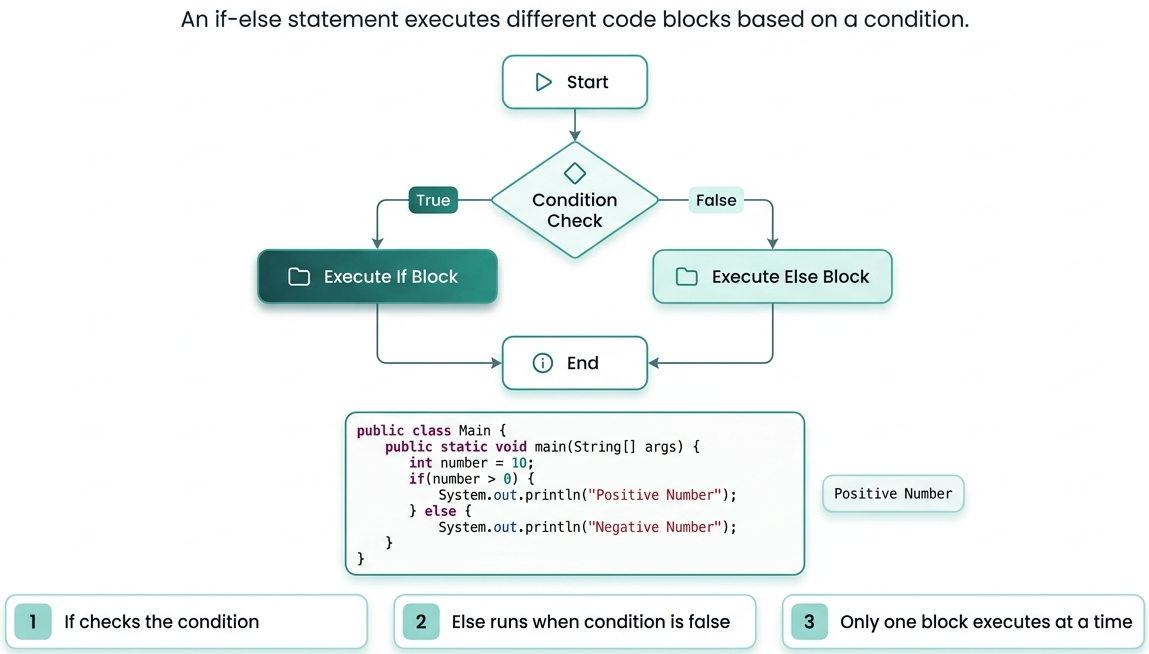
Key Features:
- Decision Making: The if-else statement helps programs make decisions based on conditions.
- Conditional Execution: It executes different blocks of code depending on whether the condition is true or false.
- Improves Program Flexibility: It allows programs to respond differently to different inputs and situations.
- Supports Logical Conditions: It works with relational and logical operators to evaluate conditions.
- Enhances Program Control Flow: It helps control the order in which statements are executed in a program.
Example: To print “Eligible to vote” if age is greater or equal to 18.if(condition)
{
// code if condition is true
}
else
{
// code if condition is false
}
// Java program to implement if-else
public class IfElseExample
{
    public static void main(String[] args)
    {
        int age = 18;

        if(age = 18)
        {
            System.out.println("Eligible to vote");
        }
        else
        {
            System.out.println("Not eligible to vote");
        }
    }
}
Output:
Explanation:Eligible to vote
- The variable age in above code stores value 18.
- The condition age = 18 is checked.
- Since the condition is true, the if block executes.
- Therefore, "Eligible to vote" is printed.
Else-If Ladder
The else-if ladder is used when multiple conditions need to be checked.This is helpful when you have to check multiple conditions. The program executes the block whose condition becomes true first.Syntax:
Example: Program: To print “Grade A” if marks are = 90 and “Grade B” if marks are =70 and “Grade C” if marks are = 50 else print “Fail”.if(condition1)
{
// code
}
else if(condition2)
{
// code
}
else
{
// code
}
// Java program to implement else-if ladder
public class ElseIfExample
{
    public static void main(String[] args)
    {
        int marks = 75;

        if(marks = 90)
        {
            System.out.println("Grade A");
        }
        else if(marks = 70)
        {
            System.out.println("Grade B");
        }
        else if(marks = 50)
        {
            System.out.println("Grade C");
        }
        else
        {
            System.out.println("Fail");
        }
    }
}
Output:
Explanation:Grade B
- The value of marks in above code is 75.
- The first condition marks = 90 is false as marks is 75
- Now, the second condition marks = 70 is true.
- Therefore, "Grade B" is printed.
Nested If-Else
A nested if-else statement means placing one if-else statement inside another if or else block. It is used when multiple conditions depend on each other.Syntax:
Example: Print “Can drive” if person has both 18+ age and license and if person has only age 18+ but no license then print “License required” otherwise print “Underage”.if(condition1)
{
if(condition2)
{
// code
}
else
{
// code
}
}
else
{
// code
}
// Java program to implement nested
// if-else
public class NestedIfExample
{
    public static void main(String[] args)
    {
        int age = 20;
        boolean hasLicense = true;

        if(age = 18)
        {
            if(hasLicense)
            {
                System.out.println("Can drive");
            }
            else
            {
                System.out.println("License required");
            }
        }
        else
        {
            System.out.println("Underage");
        }
    }
}
Output:
Explanation:Can drive
- First condition checks whether age is at least 18.
- Since it is true, the inner if condition checks for license.
- hasLicense is true, so "Can drive" is printed.
Common Mistakes
Here are some common mistakes to avoid when using if-else:
- Using Assignment Instead of Comparison: Many beginners use = instead of == while checking conditions.
- Missing Curly Braces: Skipping braces {} can cause unexpected execution of statements.
- Incorrect Condition Logic: Writing wrong logical expressions may produce incorrect results.
- Unmatched Else Statement: An else block without a proper if statement causes errors.
- Using Semicolon After If Condition: Adding a semicolon after if(condition); ends the condition immediately.
- Incorrect Nested If-Else Structure: Improper nesting makes the code confusing and difficult to debug.
- Ignoring Else Block: Not handling the false condition may leave important cases unchecked.
- Writing Complex Conditions: Very long conditions reduce code readability and increase mistakes.
Conclusion
The if-else statement is one of the most important decision-making statements in Java. It allows programs to execute code based on conditions. Java provides different forms such as simple if-else, else-if ladder, and nested if-else to handle various decision-making scenarios effectively.Frequently Asked Questions
1. What is the purpose of else if in Java?2. When is the else block executed?The else if statement is used to check multiple conditions one after another.
3. Can we use multiple else if statements?The else block is executed when all if and else if conditions are false.
4. Is the else statement compulsory?Yes, we can use multiple else if statements in a program.
5. Can else have a condition?No, the else statement is optional.
No, the else statement does not contain any condition.

1 Comments