Every time a website sends you a notification, checks if your form is valid, or changes something on the page without refreshing, the JavaScript engine does its job in the background. It reads and runs JavaScript code, converting it into machine-readable code. You may imagine it as an interpreter that turns human-readable code into machine language. This article will tell you about the JavaScript engine and how it works.
Table of Contents
What Is A JavaScript Engine
JavaScript engine is a specific type of computer program that interprets and executes JavaScript code.
- Definition and Functionality: A JavaScript engine is a piece of software responsible for interpreting and running JavaScript code. The main function of a JavaScript engine is to take the code created by developers and make it "do" whatever it is supposed to do, like changing text on your screen or performing calculations.
- Where It Can Be Found: All contemporary web browsers (Google Chrome, Mozilla Firefox, Safari, Microsoft Edge) have their own built-in JavaScript engines. Besides, there is another place where a JavaScript engine can be found: the Node.js platform, allowing JavaScript to be run on servers and computers.
- Popular Engines: Google Chrome and Node.js use the V8 engine, Mozilla Firefox has the SpiderMonkey engine, while Safari has the JavaScriptCore (Nitro) engine. They all basically do the same thing, but are made by different companies and have some differences in optimizations.
- Why a JavaScript Engine Is Needed: Computers can understand only machine code (basically, this is a binary sequence of ones and zeroes). Since humans cannot communicate with the computer using binary language, we use JavaScript instead.
// This simple line is processed entirely by the JavaScript engine
console.log("Hello World");
Core Components Of An Engine
However, a JavaScript engine is not a single component; it consists of several tools that collaborate with each other, each handling its own responsibility related to some particular step of the code processing.
- Call Stack: It is an object that manages which functions have been invoked and are still in the process of execution. One can imagine the call stack as a tower of plates; the plate that is put at the end is taken from the top. Functions are pushed and popped from the stack depending on when they were invoked.
- Memory Heap: The huge unstructured memory area where objects, variables, and functions are stored during the execution of your program. If the call stack is the to-do list of functions, then the heap is a warehouse where all the actual items are kept.
- Parser: The component that scans your JavaScript code symbol-by-symbol and verifies whether it complies with the rules of the language, just like a teacher does before comprehending the sentence.
- Interpreter: The component that instantly turns your code into a fast-executable version and helps it execute almost instantly without any delays.
- Compiler: The component that translates the frequently used parts of your code into highly optimized machine code, which is explained in detail below in the article.
function greetUser() {
console.log("This function runs on the Call Stack");
}
greetUser(); // greetUser is pushed to the stack, runs, then popped off
How Code Gets Parsed?
Parsing is one of the first real things your code goes through in the engine; this is how the engine reads your code.
- Tokenization (Lexical analysis): The engine splits your code into "tokens" (similar to splitting sentences into words). So, let age = 25; will be divided into tokens such as let, age, =, 25, and;.
- Syntax checking: The engine checks whether the tokens conform to JS syntax rules. In case you missed a bracket or put a sign somewhere wrong, the parser will instantly throw a "SyntaxError" in your face before even running anything.
- Abstract Syntax Tree (AST): Once tokenized, the engine builds an abstract syntax tree (AST) based on your code tokens. This is a tree representation of your code that helps the engine quickly process your code sequentially.
- Reason for using trees: Using a tree representation helps the engine identify connections between the parts of your code, such as that some specific value is located inside of some specific function, just like a family tree shows relations between the members of the family.
- Speed reasons: Modern engines implement a technology of lazy parsing where the code inside functions that aren't immediately called is parsed lazily (only when necessary).
let age = 25;
// The parser breaks this into tokens: let, age, =, 25, ;
// Then arranges them into an Abstract Syntax Tree (AST)
Interpretation Vs Compilation
The combination of two types of execution strategies is used in JavaScript engines, which makes it possible to explain their speed in modern applications.
- Basic Definition: Interpretation means that an interpreter reads each line of the code sequentially and executes it on the fly, without transforming it into machine code before the process starts. This makes such execution fast enough. Compilation, on the other hand, means transforming the entire code or some of its fragments into optimized machine code before execution begins.
- Why the Combination of Both: The pure form of interpretation starts fast but is slower during further repetitions. The pure form of compilation is slow to start but fast to execute afterward.
- The Compromise: In order to be both fast to start and efficient during the execution process, both methods are used in JavaScript engines.
- The Explanation: It is like cooking using instructions from the recipe while reading them one at a time (interpretation) and reading the entire recipe beforehand, thinking about movements and then executing it very efficiently (compilation).
- Consequences: This makes it possible to make a website react to the actions of the user right after the visit, while making complicated calculations or running games and animations efficiently.
// A loop like this benefits greatly from compilation
for (let i = 0; i < 1000; i++) {
console.log(i); // repeated code gets optimized after a few runs
}
Quick Comparison: Interpreter Vs JIT Vs AOT
Here is a simple side-by-side comparison of the three main ways code can be executed, to make the differences easier to remember:
| Feature | Interpreter | JIT (Just-In-Time) Compiler | AOT (Ahead-Of-Time) Compiler |
|---|---|---|---|
| When Code Is Translated | Line by line, while running | During execution, for "hot" code only | Fully, before execution even starts |
| Startup Speed | Very fast (starts instantly) | Fast (starts like an interpreter) | Slow (must compile everything first) |
| Execution Speed | Slower overall | Fast after "hot" code is optimized | Fast from the very first run |
| Used By | Older JS engines, simple scripting tools | Modern JS engines (V8, SpiderMonkey) | Languages like C, C++, Rust |
| Best For | Short, one-time scripts | Web pages and apps with repeated code | Large software needing top performance |
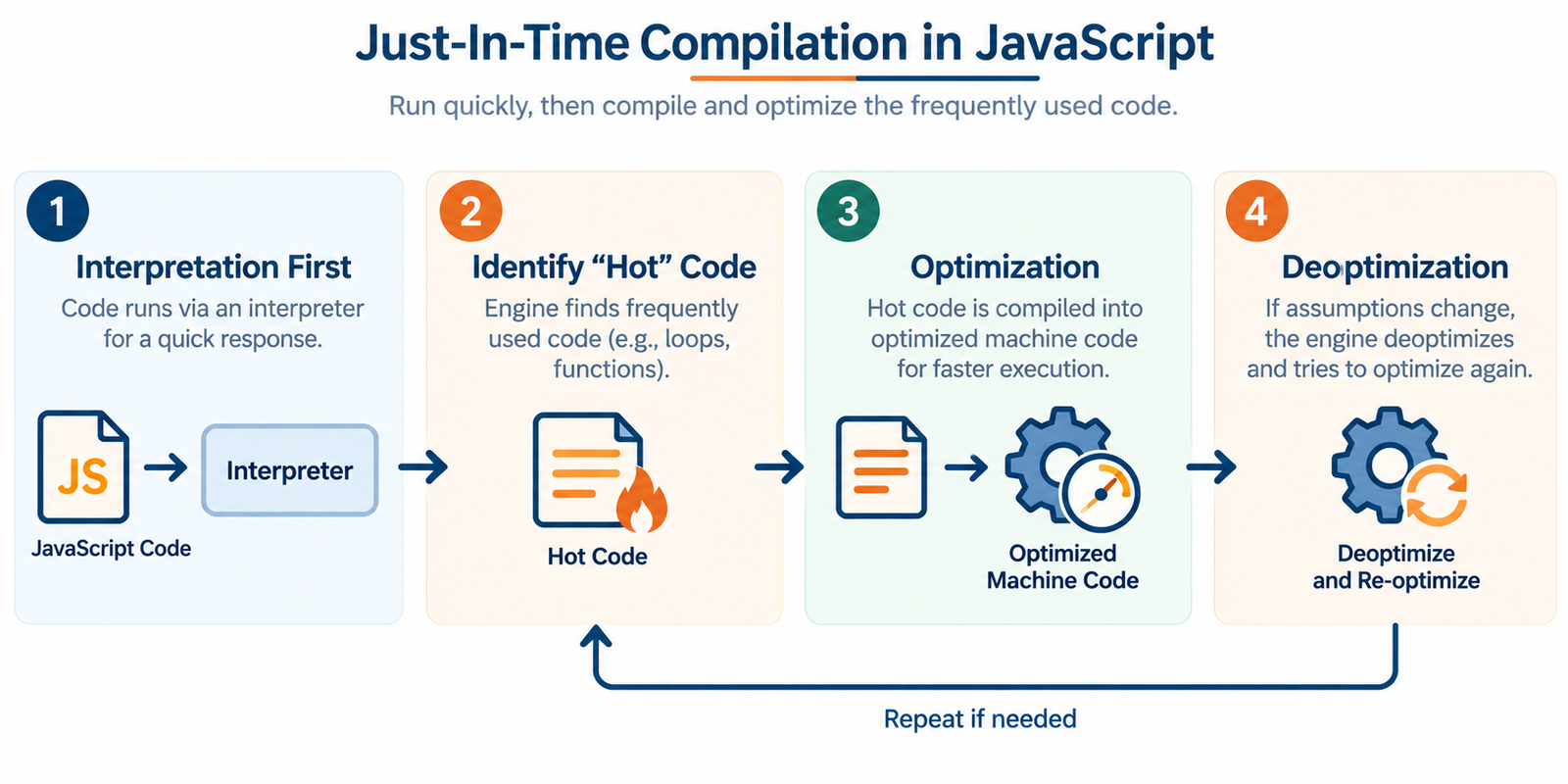
Just-In-Time Compilation
JIT (Just-In-Time) compilation is the method used by most JavaScript engines nowadays to optimize the balance between performance and efficiency. This is one of the key concepts you need to know.
JIT means "Just-In-Time," which refers to compiling the code into machine code not before execution (like in traditionally compiled languages like C++) nor during runtime on the go (as happened in the case of older interpreters).
- Interpretation First: At the very beginning of execution, your code will run via an interpreter in order to provide a quick response to users.
- Identify "Hot" Code: During the process of execution, the engine will identify pieces of code that are used many times (so-called "hot" functions or loops), like a function that runs a couple of hundred times in a game.
- Optimization: As soon as the engine identifies some pieces of code as "hot," it will compile them into optimized machine code to make further executions faster.
- Deoptimization: If some variables in the "hot" piece of code, or if some of the compiler's assumptions turn out to be wrong, it will deoptimize them and try to optimize once again.
function add(a, b) {
return a + b;
}for (let i = 0; i < 100000; i++) {
add(i, i + 1); // called repeatedly -> becomes a "hot" function -> gets optimized by JIT
}
 The Call Stack Explained
The call stack is one of the most vital components used in JavaScript when it comes to determining what to execute and in which order.
The call stack works by maintaining the order of function calls based on the LIFO principle, meaning the last function that was called is the first one that is completed and removed.
- Push and Pop Operations: Whenever a new function call is made, it is "pushed" onto the call stack. When the execution completes and a return statement is reached, it will be "popped" from the call stack.
- Single-Threaded Behavior: Since JavaScript does one thing at a time in the call stack, JavaScript is referred to as a "single-threaded" language – because there is only one call stack.
- Stack Overflow Error: If any of the functions call other functions in an infinite manner (like a function that continuously calls itself), the stack will overflow with a "stack overflow" error.
- Visualization: Picture a pile of trays at a cafeteria; you can only place and remove trays on the top, not in between.
function first() {
second();
console.log("First function finishes");
}
function second() {
console.log("Second function runs");
}
first();
// Call Stack order: first() pushed -> second() pushed -> second() popped -> first() popped
Memory Heap And Storage
While the stack controls the order of function calls, the heap is the place where your program actually stores data.
- What is Stored: Any objects, arrays, and functions (since they could be of big size and are not primitives) will be stored in the heap.
- Stack VS Heap: All primitive values (numbers, strings, and booleans) are usually stored right in the stack (or some optimized zone in it), while all objects and functions are stored in the heap.
- Reference to Memory: Unlike the stack, when you assign an object to some variable, you don't store the object itself into that variable; you put there a "reference" to the location of the object in the heap.
- Unstructured Memory: The heap is called "unstructured" since allocation and deallocation of memory can happen anywhere inside of it and in any order.
- The Reason for Importance: Knowledge about the heap explains many issues that confuse beginners, including unexpected changes to one variable after a change to another that was assigned to it before.
let person1 = { name: "Tutorialforgeeks" }; // object stored in the heap
let person2 = person1; // person2 points to the SAME object in the heap
person2.name = "Aditi";
console.log(person1.name); // outputs "Riya" because both point to the same heap object
Garbage Collection Process
As a result of constant data creation, there has to be some mechanism to clean up memory that is not in use anymore; this is called garbage collection.
- Cleanup Necessity: Every object created uses up some amount of memory; if the memory is not cleaned up, it will eventually be depleted and lead to a program crash; this is called a "memory leak."
- Reachability Concept: What objects should be kept in memory depends on whether the objects are reachable or not; this means that all data that could be accessed from the running code is considered reachable.
- Mark-and-Sweep Algorithm: The most popular algorithm used by engines is called "mark-and-sweep"; during this process, the engine marks all reachable objects and later sweeps (deletes) all that are not marked.
- Automatic Process: Unlike many languages that require programmers to manually allocate memory, garbage collection in JavaScript is done automatically.
- Performance Problem: During garbage collection, the program execution is temporarily paused; that is why modern engines use sophisticated methods (such as collecting in small amounts) to reduce this effect.
let user = { name: "Karan" };
user = null;
// The object { name: "Karan" } is no longer reachable
// The garbage collector will eventually free this memory automatically
Execution Context Basics
Every execution of the JavaScript code takes place within an environment known as the "execution context".
- Content: The execution context contains all the information about variables, this, and the reference to the outer environment (for scope resolution). It can be thought of as a container containing all the things that are needed to execute a piece of code.
- Global Execution Context: This is the first and only execution context that is automatically created when the JavaScript file starts executing. This represents the outermost execution context in which all top-level code is executed.
- Function Execution Context: Every time a function is executed, a new execution context is created for it that has all the local variables and parameters of the function.
- The Two Stages: All execution contexts have two stages - the creation phase (where memory allocation for the variables and functions takes place) and execution phase (when the actual execution of the code takes place).
- Relation Between Execution Contexts & Call Stack: All the execution contexts are nothing but the same thing that is stacked onto the call stack mentioned above.
// Global Execution Context starts here
let country = "India";function showCountry() {
// A new Function Execution Context is created here
console.log(country);
}
showCountry();
Hoisting and Scope
Hoisting and scope are two concepts of the JavaScript engine that may seem confusing for a novice user, yet they have predictable patterns.
- The Concept of Hoisting: In the creation stage of an execution context, the engine analyzes the code and moves declarations of variables and functions to the top of their scope in memory before executing anything.
- Differences between Var, let, and Const: Variables declared using the var keyword are both hoisted and assigned a value of undefined. Variables that use the let and const keywords are hoisted as well but put into a "temporal dead zone," which means that they cannot be accessed until the line where they are declared is executed.
- Function Hoisting: Standard function declarations are both hoisted, and their code is hoisted as well. This is the reason why you can use a function in the line of code that comes before the one where it was declared.
- The Concept of Scope: Scope defines which parts of the code a certain variable can be accessed in. JavaScript supports "block scope" (for let and const) and "function scope" (for var).
- Scope Chain: The engine searches for a variable starting from its current scope and moving outwards into the enclosing scope until it finds the variable or reaches the global scope.
console.log(greeting); // outputs: undefined (hoisted, not yet assigned)
var greeting = "Namaste";sayHi(); // works even though called before its definition below
function sayHi() {
console.log("Hi there!");
}
The Event Loop System
While the JavaScript engine is a single-threaded environment itself, JavaScript is able to perform certain operations such as timers and networking without stopping – all because of a special process called an event loop, which functions in conjunction with the engine.
- Single-Threaded Limitations: As there is just one call stack, JavaScript is actually able to perform only one operation at a time. If left alone, any slow task (such as fetching) would stop the whole page.
- Web APIs/Node APIs: Such operations as setTimeout, fetching data, or listening for click events are transferred to the browser (or Node.js environment) that executes them independently, separate from the JavaScript engine.
- Callback Queue: After such operations are completed, their corresponding function (callback) is added to the callback queue (also called the task queue).
- What Does an Event Loop Do?: An event loop continually checks the following question: "Is the call stack empty?" If it is, it pulls the first task from the callback queue and executes it on the call stack.
- Microtasks Vs Macrotasks: Promises use a special "microtask queue" which is checked and emptied before the main (macrotask) callback queue, thus explaining why Promises are executed slightly quicker than setTimeout and similar functions.
console.log("1: Start");
setTimeout(() => {
console.log("2: This runs later (via event loop)");
}, 0);console.log("3: End");
// Output order: 1: Start -> 3: End -> 2: This runs later (via event loop)
Different Engines Compared
Despite the fact that all JavaScript engines work based on the same principles described above, each main browser vendor creates and tunes its own implementation in its own way.
- V8 (Google): The engine used by Google in Chrome and Node.js; it is famous for its super-fast JIT compilation via such modules as "Ignition" (interpreter) and "TurboFan" (optimizing compiler) and an effective garbage collector called "Orinoco."
- SpiderMonkey (Mozilla): The first-ever developed JavaScript engine; it runs in Firefox and keeps getting improved via modern optimization layers, including its own JIT compiler "IonMonkey."
- JavaScriptCore (Apple): It is also known as "Nitro" and is used by Safari, tuned specifically for performance and power efficiency on Apple devices.
- Chakra (Legacy Microsoft): It was the JavaScript engine used in old versions of Microsoft Edge before switching to Chromium and V8.
- Why Differences Are Important: As each engine is developed independently, small performance and edge case differences between browsers are possible; therefore, developers have to test their programs on different browsers.
// This exact same code runs on V8, SpiderMonkey, and JavaScriptCore,
// but each engine internally optimizes and executes it differently
function multiply(x, y) {
return x * y;
}
console.log(multiply(4, 5));
Conclusion
The process of a JavaScript engine is quite straightforward; it includes parsing of the code, interpretation of the code, and JIT compilation for efficiency, memory management using the stack and heap, garbage collection to free up memory, and an event loop to ensure that webpages remain responsive.
There’s no need for you to memorize all the details, but having knowledge of topics such as the call stack, scope, memory, and the event loop will be helpful when debugging and writing JavaScript.
FAQs
1. Is a JavaScript engine the same as a JavaScript framework (like React)?
No. A JavaScript engine is the underlying program that runs JavaScript code itself (like V8), while a framework (like React or Vue) is a tool built using JavaScript to help developers build applications more easily. The engine runs both plain JavaScript and any framework's code.
2. Do I need to install a JavaScript engine separately to code in JavaScript?
Not for basic web development. If you have any modern browser installed, it already includes a JavaScript engine. If you want to run JavaScript outside a browser (for backend development), you would install Node.js, which comes bundled with the V8 engine.
3. Why does my code sometimes run faster the second time I run a loop?
This is a direct result of Just-In-Time (JIT) compilation. The first run is handled by the quick-starting interpreter, but if the engine notices the same code running repeatedly, it compiles that code into faster machine code, making later runs quicker.
4. What is a stack overflow error, and why does it happen?
A stack overflow happens when too many function calls are pushed onto the call stack without being removed, most commonly caused by a function that calls itself (recursion) without a proper stopping condition, filling up the stack's limited space completely.
5. Can JavaScript really only do one thing at a time?
The JavaScript engine's call stack itself can only execute one piece of code at a time, since JavaScript is single-threaded. However, with help from the event loop and external Web APIs (like timers and network requests), JavaScript can appear to handle multiple things at once without freezing the page.

0 Comments