If you have ever asked yourself how a browser knows how to interpret JavaScript, or how to execute your JavaScript program in an environment other than a web browser, like Node.js on a server, the answer to this question is the JavaScript Runtime Environment (JRE). In essence, the JavaScript runtime environment is a term used to describe the "native habitat" of your JavaScript code.
In this article, each and every aspect of the JavaScript runtime environment will be described in a very beginner-friendly manner so that one can comprehend what is happening behind the scenes when your JavaScript code is executed.
Table of Contents
What Is a JavaScript Runtime
The JavaScript runtime environment is the complete environment in which JavaScript code can be executed. It includes not only the interpreter (engine) that reads your JavaScript code, but also all the additional functionality through which JavaScript interacts with the external world, e.g., the browser window or file system of the computer.
- Definition: The runtime environment is the container that contains all things required for executing the JavaScript code, i.e., memory, execution semantics, and access to external functionality.
- Types of the JavaScript runtime: The two most popular types of the JavaScript runtime are the browser, which can be Chrome, Firefox, or Safari, and Node.js, which allows running JavaScript code on the computer outside the browser.
- Why Is This Important: JavaScript code (the core language) alone cannot perform such actions as rendering the webpage or reading files; the runtime environment enables these capabilities.
- JavaScript Engine and Additional Features: Each runtime environment is made up of the JavaScript engine and additional built-in objects/functions specific to each particular runtime environment.
- Language Consistency: Although the core JavaScript language remains the same regardless of the runtime environment, what can be done with JavaScript depends on the specific runtime environment.
// This code works the same in a browser or Node.js
// because it only uses core JavaScript
let message = "Hello, Runtime!";
console.log(message);
Core Architecture Components
Every JavaScript runtime environment is built from the same handful of architectural pieces that work together in coordination. Understanding each piece individually makes it much easier to understand how the runtime functions as a whole.
- The Engine: Sits at the center of the runtime and is responsible for parsing (reading) and executing JavaScript code.
- The Call Stack: Tracks the order in which functions are currently running, following a Last In, First Out structure.
- The Memory Heap: Stores objects, arrays, and other data that the engine needs while the program runs.
- Runtime APIs: Extra tools (Web APIs in browsers, Node APIs in Node.js) that let JavaScript interact with things outside the core language, like timers or the file system.
- The Event Loop: Continuously checks whether the call stack is empty so it can pull in the next waiting task from a queue.
// Each part plays a role even in this simple example:
// Engine parses/executes, Call Stack tracks the function,
// Web API handles the timer, Event Loop moves it back to the stack
function logMessage() {
console.log("Handled by the engine and call stack");
}
setTimeout(logMessage, 1000); // Handled by a Runtime API, then the Event Loop
Client-Side Runtime Environment
The term client-side runtime environment means the execution of JavaScript code within a user's web browser. This is how JavaScript was first used on the web.
- Runs In The Browser: Code runs locally in the browser on the user's computer, such as Chrome, Firefox, Safari, etc.
- Interacts With Users: Manages events such as clicking a button, validating forms, animating pages, and updating content dynamically.
- Does Not Cause Page Refresh: Provides the ability to dynamically change content without refreshing the entire page.
- Safe Environment: Executes in a safe environment that restricts direct access to the file system.
- Dependent on Web APIs: Uses browser Web APIs to function, e.g., DOM, fetch(), and timers.
// Client-side example: changing webpage content on a button click
document.getElementById("myButton").addEventListener("click", () => {
document.body.style.backgroundColor = "lightblue";
});
Server-Side Runtime Environment
The server-side runtime environment is defined as JavaScript executing on a server, and not on the client's side, using Node.js, for example. It deals mainly with backend code, which is invisible to the end user.
- Runs On A Server: The code runs on a separate machine (server) and not on the end user's device.
- Handles Backend Code: Deals with activities such as handling requests, making database connections, and providing web pages to users.
- Has Deeper System Access: Can access file systems, environment variables, and others.
- Serves Multiple Users: It is designed to serve requests coming from multiple users/devices at the same time.
- Powered by Node.js APIs: Uses APIs provided by Node, such as fs, http, and path.
// Server-side example: creating a simple web server with Node.js
const http = require('http');const server = http.createServer((req, res) => {
res.end('Hello from the server!');
});server.listen(3000, () => console.log('Server running on port 3000'));
The JavaScript Engine
JavaScript Engine is a software component responsible for reading your JavaScript code and transforming it into a form understandable by the computer processor. All runtimes are equipped with an engine.
- Popular Engines: The best-known is the V8 engine, developed by Google, which is used in Chrome and Node.js. Other examples of engines are SpiderMonkey (used in Firefox) and JavaScriptCore (Safari).
- Parsing the Code: The engine analyzes (parses) your JavaScript code line-by-line to detect any problems.
- Compiling to Machine Code: Today's engines use an approach called Just-In-Time (JIT) compilation, where JavaScript is converted to machine code at runtime, not ahead of time.
- Executing the Code: Finally, after compiling, the engine executes the machine code, making your program work as expected - print messages or calculate values.
- Improving Efficiency: Engines continuously monitor the performance of the code and optimize it, improving the efficiency of code execution.
// The engine parses, compiles, and executes this simple function
function add(a, b) {
return a + b;
}
console.log(add(5, 3)); // Output: 8
Call Stack Basics
The JavaScript engine keeps a record of which function is being executed using the call stack. Consider it as a pile of plates where the last plate to be placed on top will be the first plate to be taken off.
- Last In, First Out: The call stack works under the "Last In, First Out" (LIFO) mechanism, which means the most recent function is the one that gets completed and removed first.
- Functions Are Pushed: Every time a function is called, a "frame" for it is created and pushed to the top of the stack.
- Finished Functions Are Popped: Once a function has finished execution and has returned the result, the frame is popped from the stack.
- Execution of One Task at a Time: Since there is only one call stack in JavaScript, it can perform only one task at a time; hence, it is called "single-threaded."
- Stack Overflow Exception: When functions keep calling each other infinitely (without returning), it results in the stack getting full and throwing the "stack overflow" exception.
function greet() {
return sayHello();
}
function sayHello() {
return "Hello!";
}
console.log(greet());
// Call Stack order: greet() -> sayHello() -> returns -> greet() returns
Memory Heap Explained
The memory heap is a big chunk of memory that has no structure and is basically used to store objects, arrays, and functions. Contrary to the call stack, the heap does not have any order to it.
- Storage of Complex Information: Objects, arrays, and functions (which can be large and grow in size dynamically) are stored in the heap, rather than the call stack.
- Dynamic Memory Management: Heap memory can be dynamically assigned to variables without having any set structure to it.
- Reference Storing: While creating an object, the data for the object is stored in the heap, but a reference (like an address) is stored in the call stack.
- Garbage Collection: JavaScript takes care of freeing up the memory allocated to variables stored in the heap that are not being used anymore using a mechanism called "garbage collection."
- Memory Leak: If there are references that point to the variables stored in the heap but are not in use anymore, they will not be collected by the garbage collector.
// This object is stored in the memory heap
let user = {
name: "Alex",
age: 25
};
// 'user' variable on the call stack holds a reference to the heap object
Web Apis Overview
Web APIs are additional components supplied by the browser (and not by the JavaScript language) which enable your code to perform actions such as manipulating web pages, setting up timers, and making HTTP requests. They form part of the browser runtime environment.
- Not Part of Core JS: setTimeout, fetch, and document are some examples of functionalities that are not provided by JavaScript but by the browser itself in the form of Web APIs.
- DOM Manipulation: The DOM API allows JavaScript to read and manipulate the content, structure, and styling of a webpage.
- Timers: Functions like setTimeout() and setInterval() enable the execution of functions after certain delays.
- Network Requests: The fetch() API allows JavaScript to send requests to other servers without refreshing the webpage.
- Browser-Specific: Because Web APIs belong to the browser, they cannot be used in Node.js since Node has its own set of APIs.
// Using a Web API (setTimeout) to delay code execution
setTimeout(() => {
console.log("This runs after 2 seconds");
}, 2000);
Event Loop Mechanics
The event loop is what allows JavaScript to process multiple processes such as timers and network requests despite the language being able to execute only one line of code at a time. The event loop checks whether the call stack is empty in order to be able to schedule more tasks to be executed.
- Bridges Stack and Queue: The most important function of the event loop is putting new tasks into the call stack after the stack becomes empty.
- Non-blocking Process: The event loop makes it possible for tasks to not block other processes in case they are slow (e.g., a request to the server).
- Endless Cycle: The event loop constantly cycles by asking the question: "Is the call stack empty? If yes, what's next?"
- Call Stack Priority: In each cycle, the event loop first makes sure that the call stack is empty and then takes a new task from the queue.
- The Basis for Asynchronous JS: Everything about asynchronous JavaScript (the ability to perform tasks without freezing everything else) is based on the event loop.
console.log("Start");
setTimeout(() => {
console.log("Middle (delayed)");
}, 0);console.log("End");
// Output order:
// Start
// End
// Middle (delayed)
Callback Queue Role
The Task Queue (or “task queue”, or “macrotask queue”) is where tasks that were fired off by Web APIs wait until they are ready to be executed by the call stack.
- Waiting Room: After the completion of a task that originated from Web APIs (for example, a timer), its callback function is moved to the callback queue.
- First-In, First-Out: The difference between the callback queue and the call stack is that tasks in the former operate on the “First-In, First-Out” (FIFO) principle, meaning that the first task added to the queue will be processed first.
- Task Queue Dependence on Event Loop: Tasks in the queue can transition to the call stack only if the event loop checks that the call stack is empty.
- Tasks in Queue Examples: Some common examples of tasks in the callback queue are timer callbacks (setTimeout, setInterval) and event handlers (clicks).
- No Instantaneous Execution: Setting setTimeout to zero (setTimeout(fn, 0)) doesn’t guarantee that the function will be executed right away; it will still wait in the queue until the call stack is empty.
console.log("A");
setTimeout(() => console.log("B (from callback queue)"), 100);
console.log("C");
// Output: A, C, B (from callback queue)
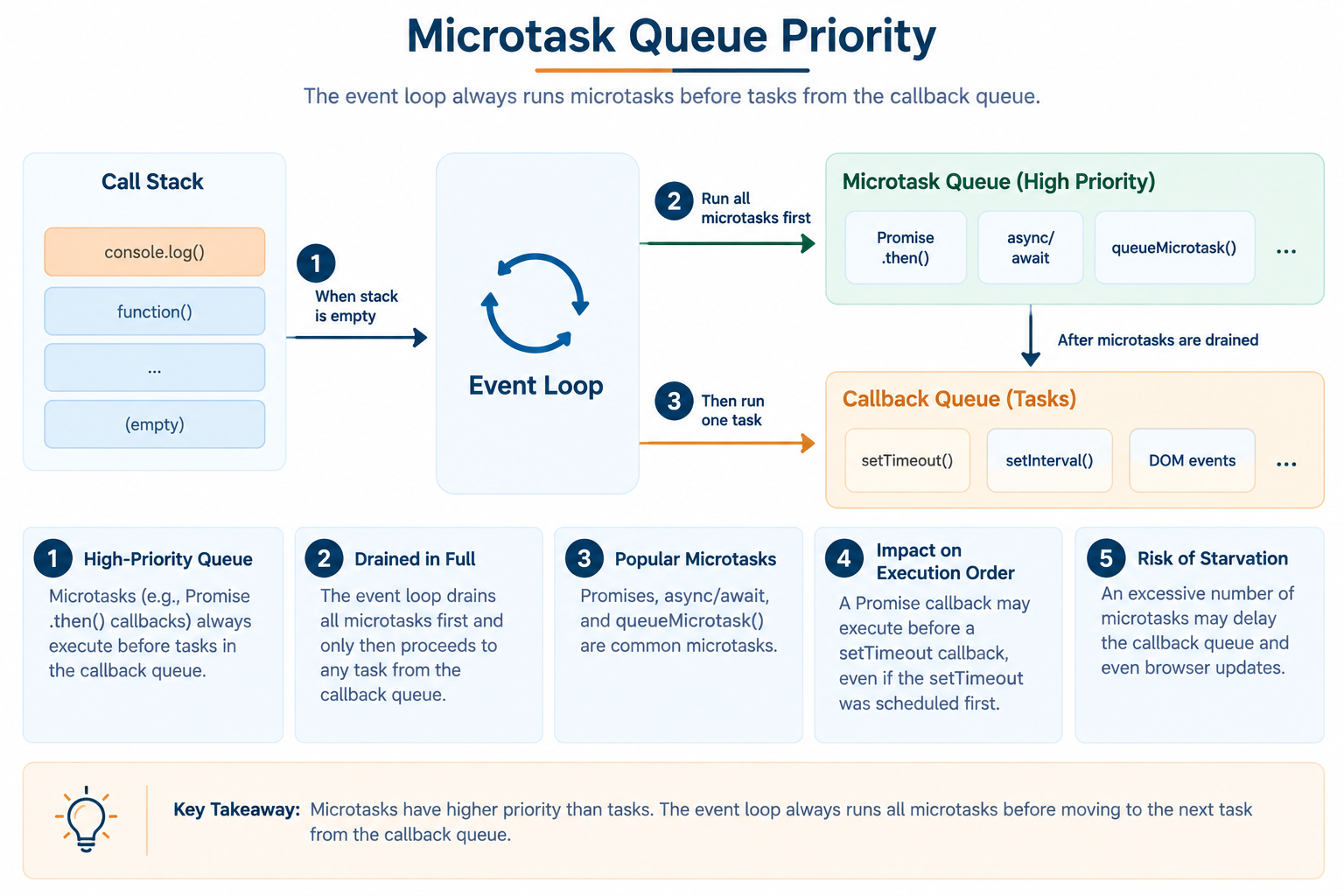
Microtask Queue Priority
The microtask queue is a particular type of high-priority queue that is mostly employed for Promises. It takes precedence over the default callback queue, making it crucial for comprehending the execution order of modern JavaScript.
- High-Priority Queue: Microtasks (such as Promise .then() callbacks) always execute before the tasks in the default callback queue.
- Drained in Full: The Event Loop drains all the microtasks first and only then proceeds to any task from the callback queue.
- Popular Microtasks: Promises, async/await, and queueMicrotask() are some of the most popular microtasks.
- Impact on Execution Order: Because microtasks take priority, a callback of a Promise may execute before a setTimeout callback, even if the latter should have been executed first.
- Risk of Starvation: Although it is a very effective concept, an excess of microtasks may postpone the callback queue and even updates in the browser environment.
console.log("1");
setTimeout(() => console.log("2 (callback queue)"), 0);
Promise.resolve().then(() => console.log("3 (microtask queue)"));
console.log("4");
// Output: 1, 4, 3 (microtask queue), 2 (callback queue)
Node.js Runtime Basics
Node.js is an environment where JavaScript can be run on a computer rather than in the browser environment. In addition to using the Google Chrome V8 engine for parsing JavaScript, Node.js includes many of its own components.
- Built on Google Chrome V8: Node.js runs JavaScript in the V8 engine, as does the Chrome browser itself.
- Server-side functionality: In contrast with the browsers, Node.js lets JavaScript interact with the local file system and write and read files from it.
- No access to the DOM objects: No document object, or any other DOM-related objects, exist in the Node.js environment since there is no browser window present.
- npm library: Node.js includes npm, which stands for Node Package Manager, a huge collection of free and reusable code packages.
- Usage examples: Node.js is commonly used to develop web servers, command-line applications, and backends for websites.
// This code only works in Node.js, not in a browser
const fs = require('fs');fs.writeFileSync('example.txt', 'Hello from Node.js!');
console.log('File created successfully');
Browser Runtime Vs Node.js Runtime: A Quick Comparison
| Feature | Browser Runtime | Node.js Runtime |
|---|---|---|
| JavaScript Engine | Varies by browser (V8 in Chrome, SpiderMonkey in Firefox, JavaScriptCore in Safari) | V8 (same engine as Chrome) |
| DOM Access | Yes, full access via the document object | No, there is no webpage, so no DOM |
| File System Access | No, blocked for security reasons | Yes, via the built-in fs module |
| Global Object | window | global |
| Module System | ES Modules (import/export), loaded via <script> tags or bundlers | CommonJS (require/module.exports) by default; ES Modules are also supported |
| Networking | fetch(), XMLHttpRequest | Built-in http/https modules, plus fetch() in newer versions |
| Package Management | No built-in manager; relies on CDNs or bundlers like Webpack | Built-in via npm or yarn |
| Primary Use Case | Building interactive user interfaces on webpages | Building servers, APIs, and command-line tools |
| Timers | setTimeout, setInterval (Web APIs) | setTimeout, setInterval (Node APIs, slightly different internals) |
| Security Sandbox | Heavily sandboxed to protect the user's computer | Full system access, since it runs directly on the machine |
Synchronous Vs Asynchronous
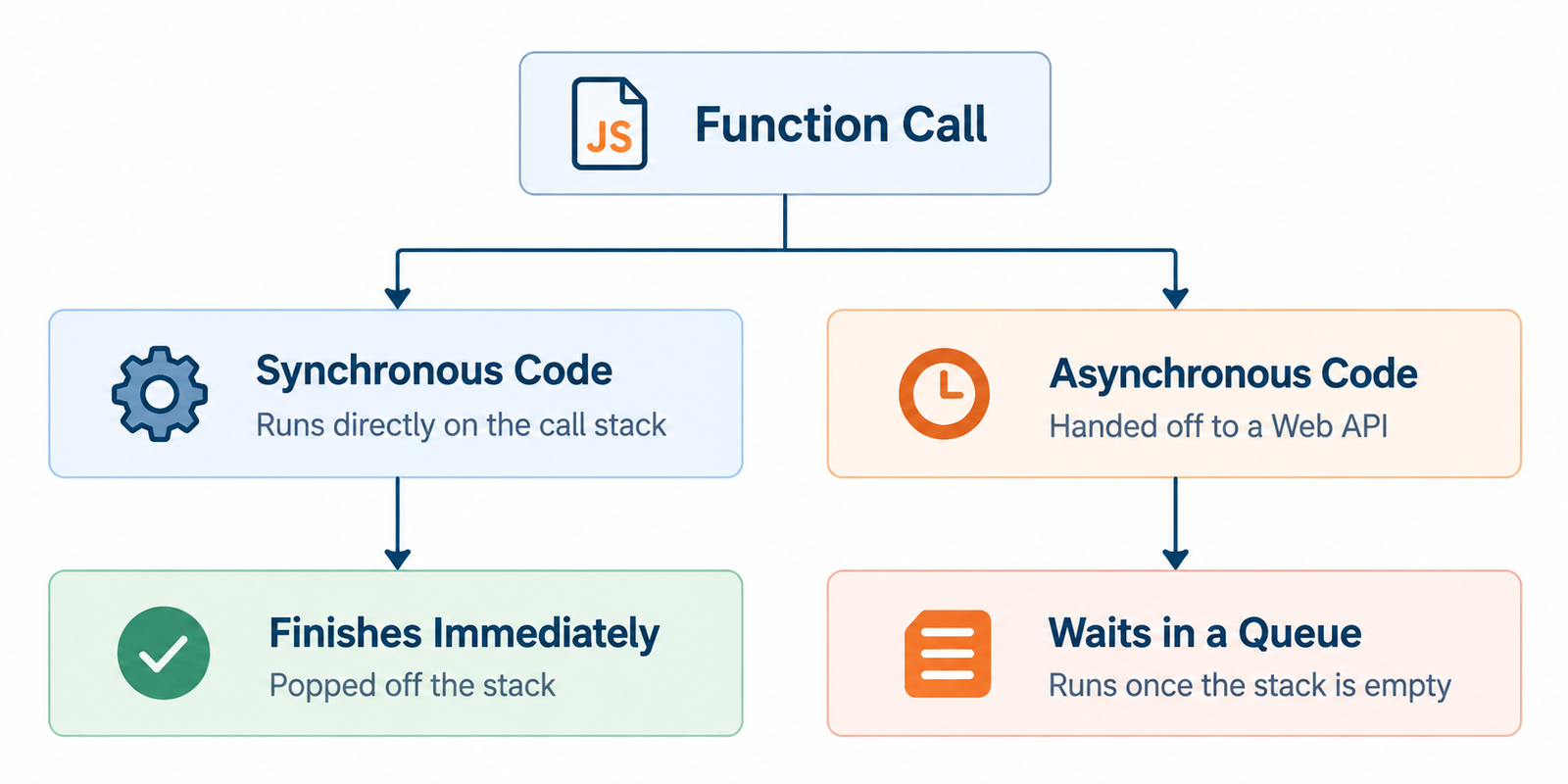
It is necessary to know the distinction between synchronous and asynchronous code in order to understand the importance of the runtime environment that consists of queues and event loops.
- Definition of Synchronous: Synchronous code means that it runs line by line, and each subsequent line can only execute after the previous line is done.
- Definition of Asynchronous: In asynchronous code, certain processes (e.g., fetching data) can happen in the background without halting the rest of the code.
- Blocking vs Non-Blocking: Synchronous code is blocking, whereas asynchronous code is non-blocking.
- Analogy in Real Life: Synchronous code is like ordering food from the counter and staying there till you get your order, whereas in asynchronous code you get a buzzer and then wait for your food.
- Importance of Async: In the absence of asynchronous behavior, a single slow process (large download, for example) can stall the entire application, including buttons and animations.
// Synchronous example
console.log("Step 1");
console.log("Step 2");
console.log("Step 3");
// Runs strictly top to bottom, one at a time// Asynchronous example
console.log("Step 1");
setTimeout(() => console.log("Step 2 (delayed)"), 1000);
console.log("Step 3");
// Step 3 runs before the delayed Step 2
Conclusion
The JavaScript runtime environment could appear to be a complex term to the novice programmer at the very beginning of learning, but as you may have noticed by now, this is a simple system consisting of several important components: the engine responsible for parsing and executing the code, the call stack for managing functions, the memory heap that is used to allocate data, as well as the asynchronous mechanism represented by the API, queues, and the event loop, which makes JavaScript capable of doing several things at once without stopping. No matter whether your JavaScript code operates in the browser or via the Node.js environment on the server, these four main components will always be available to you, even though you do not see them.
Frequently Asked Questions
1. Is the JavaScript engine the same thing as the JavaScript runtime environment?
No. The engine is only one part of the runtime environment. The engine reads and executes code, while the runtime environment also includes extra features like Web APIs, the call stack, the memory heap, and queues that the engine alone does not provide.
2. Why is JavaScript called "single-threaded" if it can handle so many tasks at once?
JavaScript is single-threaded because it has only one call stack, meaning it can only actively execute one piece of code at any given moment. The "multitasking" feeling comes from the event loop and queues managing background tasks, not from JavaScript literally doing multiple things simultaneously.
3. What is the difference between the callback queue and the microtask queue?
The microtask queue (used by Promises) always has higher priority and is fully emptied before the event loop touches the callback queue (used by things like setTimeout). This means Promise-based code often runs sooner than timer-based code, even with similar delays.
4. Can I use Web APIs like fetch() in Node.js the same way I do in a browser?
Not automatically in older versions. Traditionally, Web APIs like document were browser-only, and Node.js had separate equivalents. However, newer versions of Node.js have added built-in support for some browser-like APIs, such as fetch(), though many DOM-specific ones like document are still unavailable.
5. What happens if the memory heap runs out of space?
If too many objects are created and not properly cleaned up by garbage collection, the program can run out of available memory, leading to a crash or an "out of memory" error. Being mindful of unused references helps prevent this issue, especially in long-running applications.

0 Comments