The match-case statement is a pattern-matching feature introduced in Python 3.10. It provides a cleaner and more readable alternative to writing multiple if-elif-else statements when you need to compare a variable against different possible values. Unlike the traditional switch statement found in many programming languages, Python's match-case is much more powerful. It can match values, sequences, dictionaries, classes, and even use conditions (guards), making it a versatile tool for writing clean and maintainable code.
Whether you are building menu-driven applications, processing user input, handling API responses, or working with complex data structures, the match-case statement can simplify your code significantly.
Table of Contents
What is Match Case in Python?
The match-case statement is a control flow statement that compares a subject (variable or expression) against multiple patterns. Python checks each pattern one by one and executes the code block corresponding to the first matching case. If no pattern matches, the optional wildcard case (case _:) is executed.
Syntax:
match subject:
case pattern1:
# Code block
case pattern2:
# Code block
case pattern3:
# Code block
case _:
# Default block
Flowchart of Match Case
The flowchart illustrates how the match-case statement works in Python. It evaluates an expression and compares it with each case in order. When a matching case is found, Python executes its corresponding block and skips the remaining cases.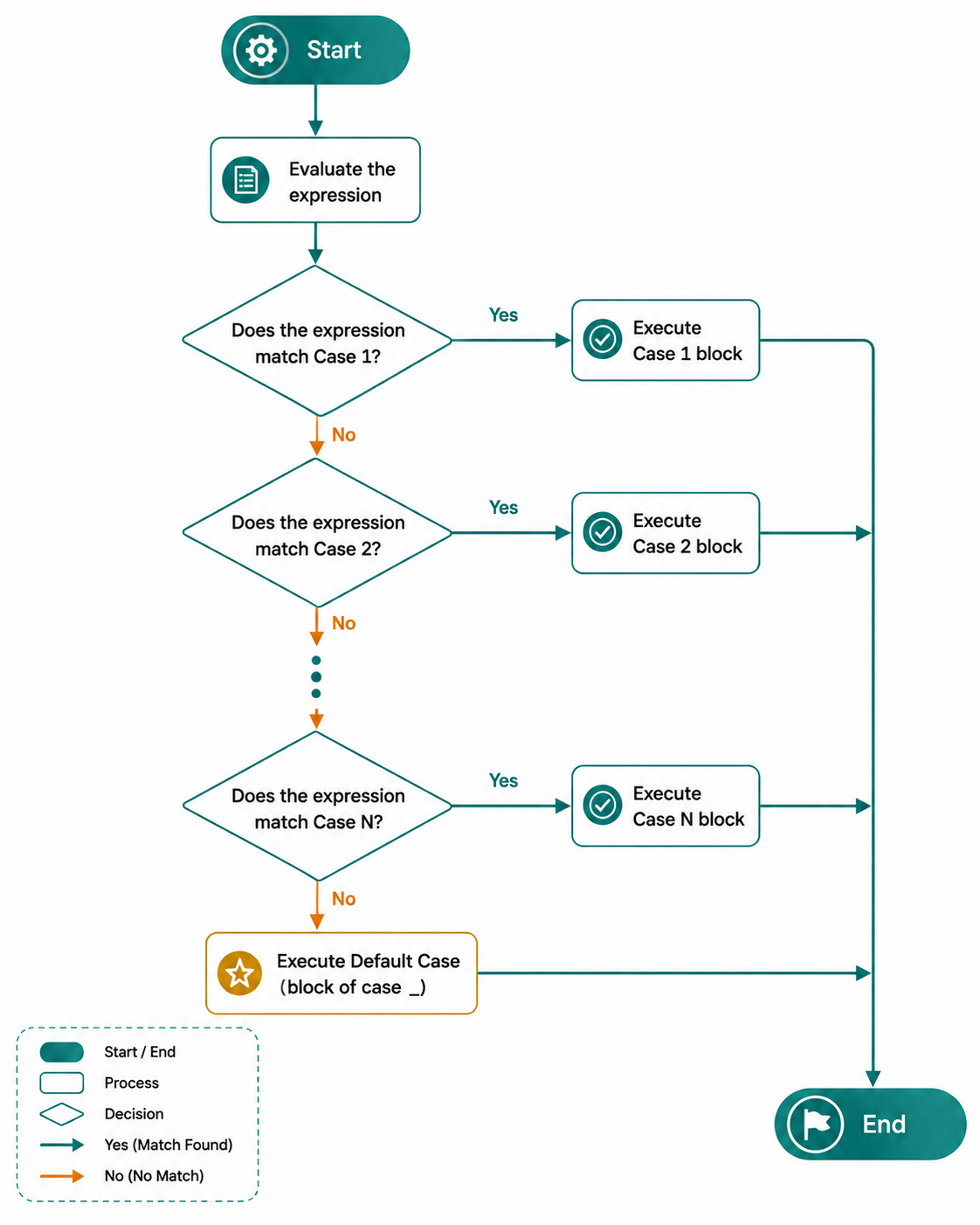
Step 1: Start the Program: The program begins execution and reaches the match statement.
Step 2: Evaluate the Expression: Python evaluates the expression specified after the match keyword. This value is then compared with each case in sequence.
Step 3: Check the First Case: Python compares the expression with Case 1.
- If the expression matches Case 1, Python executes the corresponding case block and skips all remaining cases.
- If it does not match, Python moves to the next case.
Step 4: Check the Remaining Cases: Python continues comparing the expression with each subsequent case one by one until it finds a matching case.
Step 5: Execute the Matching Case: When a matching case is found, Python executes the statements inside that case block and immediately exits the match statement.
Step 6: Execute the Default Case: If none of the specified cases match the expression, Python executes the default case (case _). The underscore (_) acts as a wildcard and handles all unmatched values.
Step 7: Continue Program Execution: After executing either a matching case block or the default case _ block, Python exits the match-case statement and continues executing the remaining statements in the program.
Note:
Only one case block is executed in a match-case statement. Once Python finds the first matching case, it ignores all remaining cases.
Examples of Match-case
Example 1: Display the Day of the WeekThe following program uses the match-case statement to display the name of a day based on its corresponding number.
day = 3

match day:
    case 1:
        print("Monday")
    case 2:
        print("Tuesday")
    case 3:
        print("Wednesday")
    case 4:
        print("Thursday")
    case 5:
        print("Friday")
    case 6:
        print("Saturday")
    case 7:
        print("Sunday")
    case _:
        print("Invalid day number")
Output:
Explanation:Wednesday
In this example, the value of day is 3.
- Python evaluates the expression day in the match statement.
- It compares the value 3 with each case one by one.
- case 1 and case 2 do not match, so Python continues checking the next case.
- case 3 matches the value of day, so Python executes print("Wednesday").
- After executing the matching case, Python exits the match-case statement and skips the remaining cases, including the default case _.
- Therefore, the output of the program is Wednesday.
The following program uses the match-case statement to identify a fruit and display its corresponding description. If the fruit does not match any of the specified cases, the default case is executed.
# Python program to demonstrate match case

fruit = "Apple"

match fruit:
    case "Apple":
        print("Red Fruit")

    case "Banana":
        print("Yellow Fruit")

    case "Mango":
        print("King of Fruits")

    case _:
        print("Unknown Fruit")
Output:
Red Fruit
Explanation:
The value of fruit is Apple, so Python matches it with the case Apple and prints Red Fruit.
Conclusion
The match-case statement is one of the most significant additions to modern Python, offering a concise and expressive way to handle multiple patterns. It goes far beyond the traditional switch statement by supporting structural pattern matching, guards, and matching of complex data types. When used appropriately, match-case improves code readability, reduces repetitive conditional logic, and makes programs easier to maintain. For developers using Python 3.10 or later, learning match-case is a valuable step toward writing cleaner and more idiomatic Python code.
Frequently Asked Questions
1. Is match-case the same as a switch statement?
No. While it can replace many switch-style use cases, Python's match-case is much more powerful because it supports structural pattern matching for sequences, mappings, and objects.
2. Which Python version supports match-case?
The match-case statement is available starting from Python 3.10.
3. Can match-case replace if-else completely?
No. if-else is still better for evaluating arbitrary boolean expressions, mathematical comparisons, and complex logical conditions. match-case is ideal for matching patterns and specific values.
4. Can match-case work with lists and dictionaries?
Yes. It supports structural pattern matching for lists, tuples, dictionaries, and even user-defined classes.
5. What is the purpose of the wildcard (_) in match-case?
The wildcard (_) acts as the default case. It matches any value that does not match the previous cases, making it useful for handling unexpected or invalid inputs.
6. Can multiple cases be combined in a match-case statement?
Yes. You can combine multiple patterns using the pipe (|) operator. This allows a single block of code to execute when any one of the specified patterns matches.

0 Comments