As you progress in Python, you'll often encounter problems that require repeating one loop inside another. This is where nested loops come in. Whether you're working with matrices, generating patterns, processing tables of data, or comparing multiple values, nested loops provide a structured way to handle repetitive tasks involving multiple dimensions.
In this guide, you'll learn what nested loops are, how they execute step by step, how to use different combinations of for and while loops, and where they are most useful. Along the way, you'll also explore practical examples, common mistakes to avoid, and tips for writing efficient and readable nested loops in Python.
Table of Contents
A nested loop is a loop placed inside another loop. The outer loop executes first, and for every iteration of the outer loop, the inner loop runs from start to finish. This allows you to perform repetitive tasks that involve multiple levels of iteration.
Syntax:
for outer in range(3):
for inner in range(2):
print(f"Outer: {outer}, Inner: {inner}")
Explanation:
A nested loop consists of two parts:
- Outer loop: Controls how many times the inner loop will execute.
- Inner loop: Runs completely for each iteration of the outer loop.
In the example above:
- The outer loop runs 3 times.
- During each outer loop iteration, the inner loop runs 2 times.
- Therefore, the print() statement executes 6 times in total.
Example:
for i in range(2):
    for j in range(3):
        print(i, j)
Output:
0 0
0 1
0 2
1 0
1 1
1 2
Why Use Nested Loops?
Nested loops are useful whenever data has more than one level or dimension. Some common applications include:
- Working with Rows and Columns: Nested loops make it easy to process data arranged in rows and columns, such as tables or matrices. The outer loop can handle the rows, while the inner loop processes the elements in each row.
- Processing Multi-Dimensional Data: They are useful for working with data that has more than one dimension, such as lists of lists, matrices, and grids. Each loop can handle one level of the data structure.
- Creating Patterns: Nested loops are commonly used to create patterns using numbers, characters, or symbols. The outer loop controls the rows, while the inner loop controls the elements printed in each row.
- Comparing Multiple Values: Nested loops can be used when every item in one collection needs to be compared with items in another collection. This is useful for finding combinations, matches, or relationships between values.
- Repeating Dependent Tasks: Sometimes one task needs to be repeated for each iteration of another. Nested loops allow the inner operation to run completely for each iteration of the outer loop.
- Traversing Grids and Matrices: Nested loops are useful for navigating grids and matrices because one loop can iterate over rows while another iterates over columns. This makes them common in problems involving games, image processing, and mathematical operations.
How Nested Loops Work?
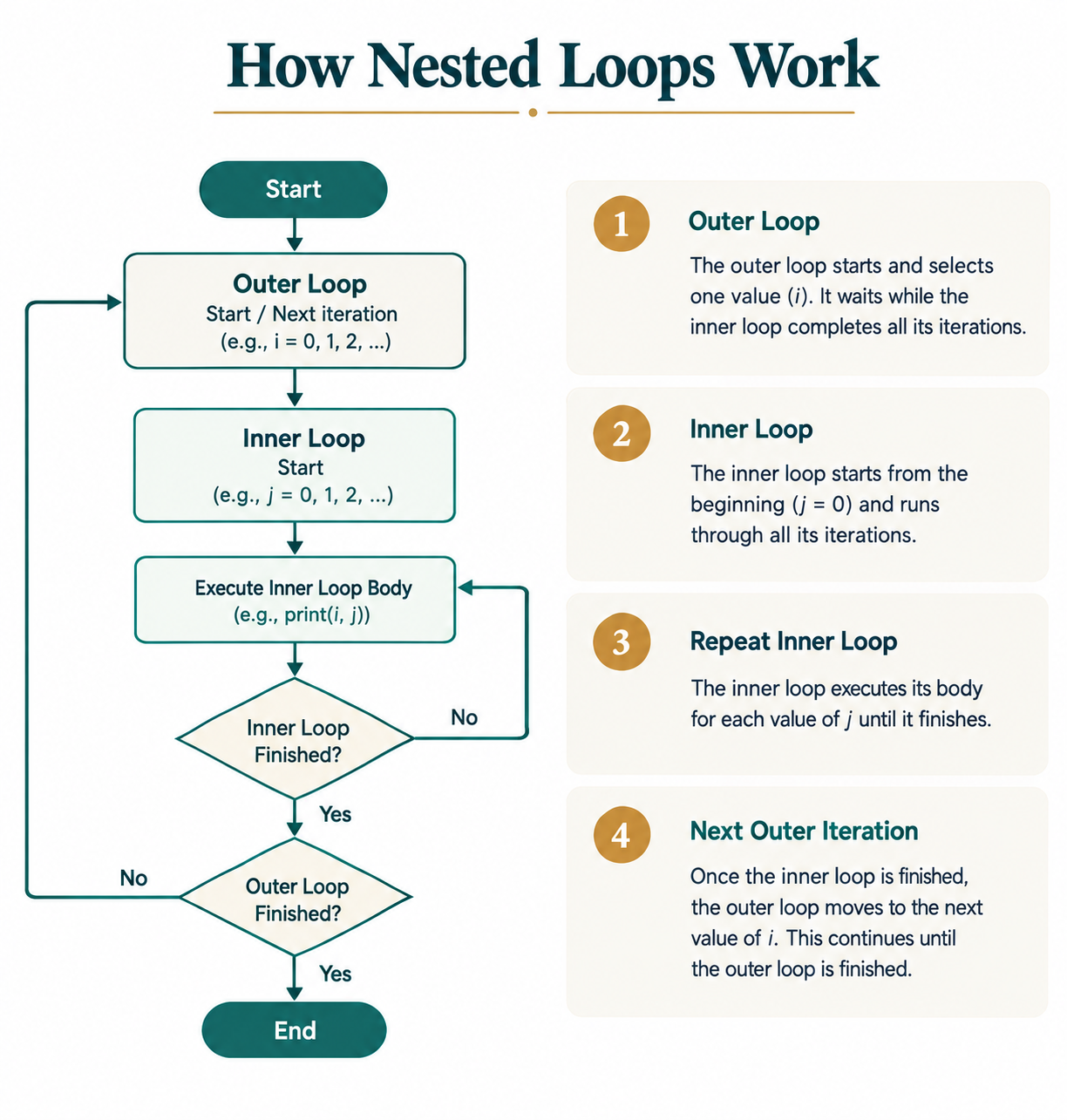
The outer loop advances one step at a time. Before moving to its next iteration, it allows the inner loop to complete all of its iterations. This process repeats until the outer loop finishes.
Consider the following example:
for i in range(2):
for j in range(3):
print(i, j)
Let's see how Python executes it:
1. First outer loop iteration (i = 0)
- Inner loop starts.
- j = 0 → prints 0 0
- j = 1 → prints 0 1
- j = 2 → prints 0 2
- Inner loop ends.
2. Second outer loop iteration (i = 1)
- Inner loop starts again from the beginning.
- j = 0 → prints 1 0
- j = 1 → prints 1 1
- j = 2 → prints 1 2
- Inner loop ends.
The outer loop has now completed all its iterations, so the program moves to the next statement.
Execution Table:
| Outer Loop (i) | Inner Loop (j) | Output |
|---|---|---|
| 0 | 0 | 0 0 |
| 0 | 1 | 0 1 |
| 0 | 2 | 0 2 |
| 1 | 0 | 1 0 |
| 1 | 1 | 1 1 |
| 1 | 2 | 1 2 |
From the table, you can see that the inner loop restarts from the beginning every time the outer loop changes.
Visualizing the Process:
Think of nested loops like a classroom with rows and columns.
- The outer loop moves through each row.
- The inner loop visits every seat in the current row.
- Once all seats in a row are visited, the outer loop moves to the next row.
This systematic approach makes nested loops ideal for working with grids, matrices, and structured datasets.
Nested for Loops
The most common type of nested loop in Python is a for loop inside another for loop. It is used when the number of iterations is known in advance and is especially useful for working with sequences, tables, and two-dimensional data.Syntax:
for outer_variable in iterable1:
for inner_variable in iterable2:
# Code to execute
The outer loop iterates over the first iterable, while the inner loop completes all its iterations for each iteration of the outer loop.
Example 1: Printing Coordinate Pairs
# Python program to implement nested for loops
for row in range(3):
    for column in range(2):
        print(f"({row}, {column})")
Output:
(0, 0)
(0, 1)
(1, 0)
(1, 1)
(2, 0)
(2, 1)
Explanation:
- The outer loop represents the rows.
- The inner loop represents the columns.
- Every possible row-column combination is printed.
Example 2: Multiplication Table
# Python program to implement nested for loop
for i in range(1, 4):
    for j in range(1, 4):
        print(i * j, end="\t")
    print()
Output:
1 2 3
2 4 6
3 6 9
Explanation:
- The outer loop selects each number from 1 to 3.
- The inner loop multiplies it by every number from 1 to 3.
- print() without arguments moves the cursor to the next line after each row.
When to Use Nested for Loops?
Nested for loops are useful when one loop needs to run completely for each iteration of another loop. They are especially helpful when working with structured or multi-dimensional data.
- Working with Rows and Columns: Use nested for loops when you need to process data arranged in rows and columns, such as tables or matrices. The outer loop can iterate through rows, while the inner loop processes each value in a row.
- Creating Patterns: Nested for loops are useful for creating patterns using characters, numbers, or symbols. The outer loop controls the number of rows, while the inner loop controls the elements within each row.
- Processing Nested Collections: Use nested loops when working with collections that contain other collections, such as a list of lists. The outer loop accesses each inner collection, and the inner loop processes its elements.
- Comparing Elements from Two Collections: Nested for loops can be used when each element of one collection needs to be compared with every element of another collection. This is useful for finding matching values or possible combinations.
- Traversing Matrices and Grids: Nested loops are commonly used to visit every position in a matrix or grid. One loop handles the rows, while the other handles the columns.
- Generating Combinations: Nested for loops can generate different combinations of values when each value from one sequence needs to be paired with values from another sequence.
Nested while Loops
A nested while loop places one while loop inside another. Unlike for loops, while loops continue executing as long as a specified condition remains true. This gives you greater control over the iteration process but also requires careful management of loop variables.
Syntax:
while condition1:
while condition2:
# Code to execute
Remember to update the loop variables; otherwise, the loops may run indefinitely.
Example:
# Python program to implement nested while loop
row = 1

while row <= 3:
    column = 1

    while column <= 2:
        print(f"Row {row}, Column {column}")
        column += 1

    row += 1
Output:
Row 1, Column 1
Row 1, Column 2
Row 2, Column 1
Row 2, Column 2
Row 3, Column 1
Row 3, Column 2
Nested for vs. Nested while
| Basis of Comparison | Nested for Loop | Nested while Loop |
|---|---|---|
| Iteration Control | Best when the number of iterations is known or a sequence needs to be traversed. | Best when iterations depend on a condition. |
| Loop Variable Update | The loop variable is automatically updated for each iteration. | The loop variable usually requires manual initialization and updating. |
| Readability | Generally simpler and easier to read. | Can be more flexible but may require more careful logic. |
| Infinite Loop Risk | Lower risk of creating an infinite loop. | Higher risk if the condition is never updated or becomes False. |
Common Use Cases
Nested `while` loops are useful when an inner process needs to repeat for every iteration of an outer process. They are especially helpful when the number of iterations depends on conditions rather than a fixed sequence.- Reading Data Until a Condition Is Met: Nested `while` loops can be used when data needs to be read repeatedly until a specific condition is satisfied, while an outer loop controls a larger process.
- Building Menu-Driven Programs: They are useful for programs where an outer loop keeps the main menu running, while an inner loop handles a particular menu operation until the user chooses to exit.
- Processing User Input Repeatedly: Nested `while` loops can validate and process user input repeatedly until valid input is provided, while the outer loop controls the overall program flow.
- Working with Unknown Iterations: A nested `while` loop is useful when the number of iterations cannot be determined beforehand because both loops continue based on conditions that may change during execution.
Mixing for and while Loops
Python allows you to combine for and while loops when a task requires both a fixed number of iterations and condition-based repetition.
Example:
# Python program to implement mixed loops
for launch in range(1, 4):
    countdown = 3

    print(f"Launch {launch}")

    while countdown > 0:
        print(countdown)
        countdown -= 1

    print("Lift off!\n")
Output:
Launch 1
3
2
1
Lift off!Launch 2
3
2
1
Lift off!Launch 3
3
2
1
Lift off!
Explanation:
- The for loop controls the number of launches.
- The while loop performs the countdown for each launch.
- The countdown resets for every new launch.
When to Use Mixed Loops?
Mixed loops are useful when a program needs to combine different types of loops, such as for and while, to handle tasks with different iteration requirements. They are helpful when one part of a process has a fixed number of iterations while another depends on a condition.- Processing Fixed and Unknown Iterations: Use mixed loops when one task needs to run through a known collection, while another task needs to continue until a specific condition is met.
- Processing Nested Data: Mixed loops can be useful when working with nested data where the outer structure can be processed using a for loop, while the inner process depends on a condition and requires a while loop.
- Validating Input for Each Item: A for loop can process a fixed set of items, while a while loop can repeatedly ask for valid input related to each item.
- Menu-Based Processing: A while loop can keep a menu-driven program running, while a for loop can process a fixed collection of items selected by the user.
- Combining Sequential and Conditional Processing: Mixed loops are useful when one part of a program requires sequential iteration and another part requires condition-based repetition. This allows each loop to handle the type of repetition it is best suited for.
Common Applications of Nested Loops
Nested loops are useful whenever a task involves multiple levels of iteration. Some common applications include:
1. Traversing 2D Lists (Matrices): Accessing rows and columns in a two-dimensional list.
matrix = [
[1, 2],
[3, 4]
]for row in matrix:
for value in row:
print(value)
2. Printing Patterns: Creating star, number, or pyramid patterns.
for i in range(3):
for j in range(4):
print("*", end=" ")
print()
3. Generating Combinations: Finding every possible combination between two collections.
numbers = [1, 2]
letters = ["A", "B"]for num in numbers:
for letter in letters:
print(num, letter)
4. Other Uses: Nested loops are also commonly used for:
- Building multiplication tables.
- Processing rows and columns.
- Comparing elements in different collections.
- Working with grids and game boards.
Pattern Printing Using Nested Loops
Pattern printing is one of the most common applications of nested loops. The outer loop controls the number of rows, while the inner loop determines what is printed in each row.Example 1: Square Star Pattern
#Python program to print square star pattern
for i in range(4):
    for j in range(4):
        print("*", end=" ")
    print()
Output:
* * * *
* * * *
* * * *
* * * *
Here, the outer loop runs four times to create four rows, and the inner loop prints four stars in each row.
Example 2: Right Triangle Pattern
# Python program to print right triangle pattern
for i in range(1, 5):
    for j in range(i):
        print("*", end=" ")
    print()
Output:
*
* *
* * *
* * * *
In this example, the number of stars printed depends on the current value of the outer loop. As the row number increases, the inner loop prints one additional star.
Using break and continue in Nested Loops
The break and continue statements work in nested loops just as they do in regular loops. However, they affect only the loop in which they are used.
1. Using break: The break statement immediately terminates the loop in which it is used. In nested loops, it exits the inner loop, while the outer loop continues with its next iteration.
for i in range(3):
    for j in range(5):
        if j == 2:
            break
        print(i, j)
Output:
0 0
0 1
1 0
1 1
2 0
2 1
Here, when j becomes 2, the break statement exits the inner loop. The outer loop then continues with the next value of i.
2. Using continue: The continue statement skips the remaining statements in the current iteration of the loop and moves to its next iteration. In a nested loop, it affects only the loop in which it appears.
for i in range(2):
    for j in range(4):
        if j == 2:
            continue
        print(i, j)
Output:
0 0
0 1
0 3
1 0
1 1
1 3
Here, when j is 2, continue skips the print() statement for that iteration. The inner loop then continues with j = 3.
Key Points:
- break exits the current loop: It terminates only the loop in which it is written, not all nested loops.
- continue skips the current iteration: It skips the remaining code for that iteration and moves to the next iteration of the current loop.
- Outer loops continue normally: When break or continue is used in an inner loop, the outer loop is not directly affected.
- Use them carefully: Proper use of break and continue can simplify loop control and avoid unnecessary iterations.
Common Mistakes
When learning nested loops, beginners often run into a few common issues. Being aware of these mistakes can help you write cleaner and more efficient code.1. Incorrect Indentation
Since Python uses indentation to define code blocks, incorrect indentation can lead to errors or unexpected behavior.
for i in range(3):
    for j in range(2):
        print(i, j)   # Correctly indented
2. Using the Same Variable Name
Avoid using the same variable for both loops, as it can overwrite values and make the code confusing.
Incorrect:
for i in range(3):
    for i in range(2):
        print(i)
Use different variable names such as i and j instead.
3. Forgetting the Time Cost
Nested loops can become slow when working with large datasets because the total number of iterations increases quickly.
4. Writing Complex Nested Loops
If a nested loop becomes difficult to read, consider splitting the logic into smaller functions to improve readability.
Best Practices
Following a few simple practices can make your nested loops easier to understand and maintain.
- Keep the Nesting Level Low: Avoid unnecessary levels of nesting because deeply nested loops can make the code difficult to read and understand.
- Use Meaningful Variable Names: Choose clear variable names such as row, column, index, or item so that it is easy to understand what each loop is processing.
- Add Comments for Complex Logic: If the purpose or logic of a nested loop is not immediately clear, add a short comment to explain what the loops are doing.
- Break Large Tasks into Functions: When a nested loop becomes too large or complicated, move part of the logic into separate functions. This keeps the main code cleaner and easier to maintain.
- Avoid Unnecessary Iterations: Check whether every iteration is actually required. Reducing unnecessary iterations can improve the performance of programs that work with large amounts of data.
- Test with Small Inputs First: Test nested loops with small and simple inputs before using large datasets. This makes it easier to identify incorrect conditions, unexpected output, and other logic errors.
Conclusion
Nested loops are an essential Python concept for solving problems that involve multiple levels of iteration. They are commonly used for tasks such as traversing two-dimensional data, printing patterns, generating combinations, and processing structured information. By understanding how the outer and inner loops interact, practicing with real examples, and following best practices, you can write nested loops that are both efficient and easy to understand.
Frequently Asked Questions (FAQs)
1. Can I use more than two nested loops?
Yes. Python allows you to nest multiple loops, but excessive nesting can make code difficult to read and may reduce performance.
2. Are nested loops always slow?
Not necessarily. Their performance depends on the number of iterations and the operations performed inside the loops.
3. Can I combine for and while loops?
Yes. You can place a for loop inside a while loop or vice versa, depending on your program's requirements.
4. Does break exit all nested loops?
No. The break statement exits only the loop in which it is used. The outer loop continues executing unless additional logic is added.
5. When should I avoid nested loops?
Avoid nested loops when a simpler approach or built-in Python function can achieve the same result more efficiently.

0 Comments