JavaScript is one of the most popular programming languages in use across the globe today. This is the language that gives web pages a life of their own – enabling buttons to function and allowing for form interaction and dynamic content updates. Though initially developed to operate only on web browsers, it has come to be a language that is utilized in websites, mobile applications, servers, gaming, and smart devices, among other uses. This guide provides a basic understanding of what JavaScript is all about.
Table of Contents
What Is JavaScript?
JavaScript is a lightweight and interpreted programming language that is used for developing interactive and dynamic content on websites.
- History: The programming language was developed in 1995 by Brendan Eich at Netscape and was first known as Mocha, then LiveScript, and finally JavaScript.
- Relation to Java: Although it sounds similar to the programming language Java, there is virtually no relation between the two languages, since the similarity in names was mostly a marketing ploy.
- Use as Client-Side Language: It is run directly within the web browser of the user to make it possible for the web page to react to any click or other action right away without contacting the server.
- Use Outside of the Browser: JavaScript is now also able to run without a browser environment because of a framework called Node.js. It means that JavaScript is now capable of running "back-end" or server-side applications as well.
Key Features of JavaScript
Below are some of the important features of JavaScript:
- Interpreted Programming: The JavaScript code executes one line at a time inside the web browser or the runtime environment without the need for conversion into machine code.
- Dynamic Typing: No need to specify the data type of a variable in advance in JavaScript; one can store a value of any data type in the same variable.
- Event-driven Programming: JavaScript is capable of performing certain operations when an event such as a click, keyboard stroke, or document load occurs.
- Cross-platform Programming: JavaScript runs across all modern browsers, operating systems, and increasingly on the server side as well.
- Asynchronous Programming: JavaScript has the ability to execute tasks such as getting data from a server in the background.
Example: A simple event listener
// Runs code when a button is clicked
document.getElementById("myButton").addEventListener("click", function() {
  alert("Button was clicked!");
});
Core Building Blocks
JavaScript becomes much easier to understand when you learn its core building blocks one by one. These basics form the foundation for writing, reading, and debugging JavaScript programs.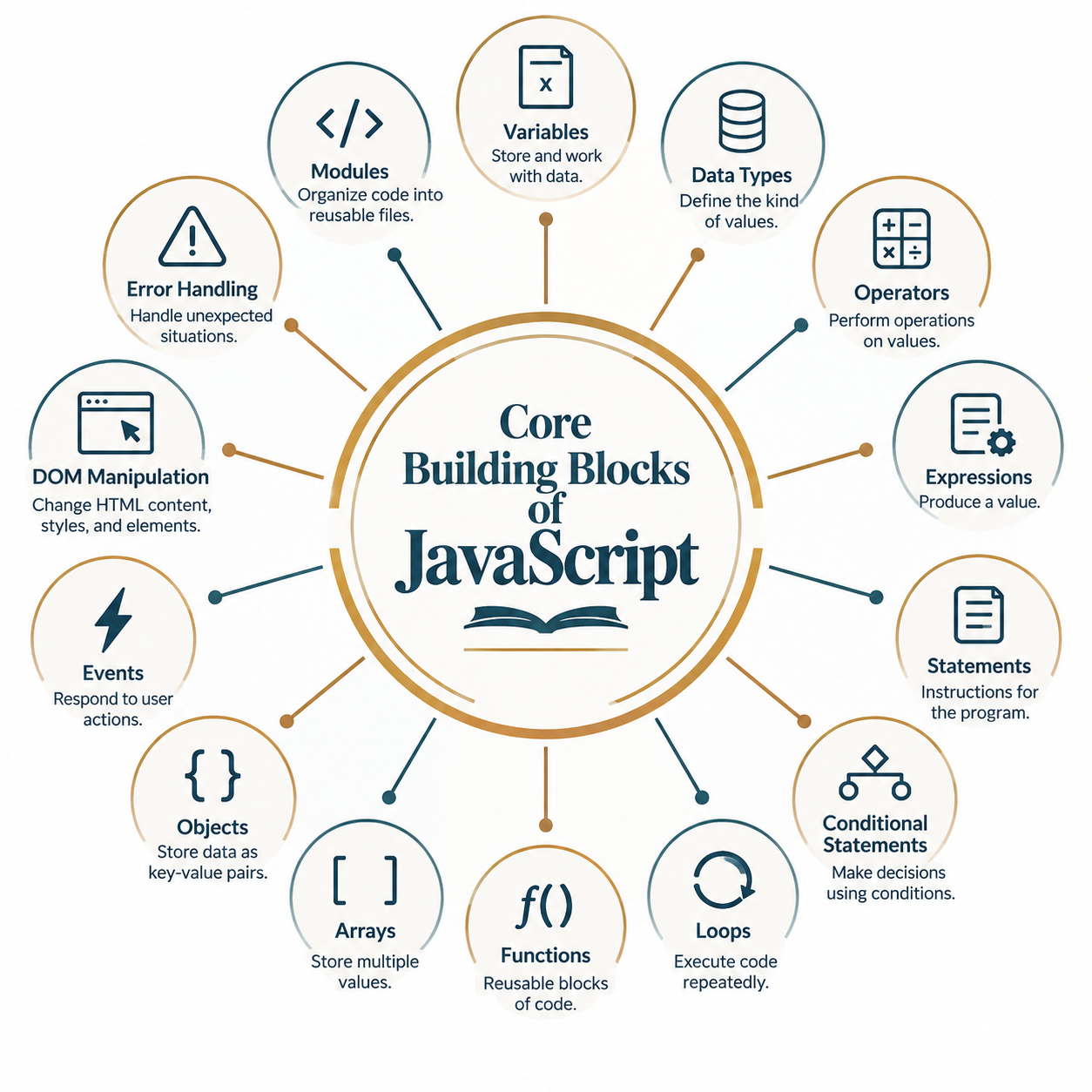
- Variables: Data containers created by let, const, or the old-fashioned var keyword.
- Data Types: These include strings, numbers, booleans, arrays, objects, among others; some special data types like undefined and null exist in JavaScript.
- Operators: Operators are used to perform operations on values and variables, such as arithmetic calculations, comparisons, assignments, and logical operations
- Expressions: An expression is a piece of code that produces a value. For example, 10 + 5 is an expression that evaluates to 15.
- Statements: Statements are instructions that tell JavaScript what to do. Examples include variable declarations, conditional statements, loops, and function calls.
- Conditional Statements: Statements such as if, else, and switch that help the program make decisions.
- Loops: Loops such as for and while allow repetition of a code segment several times.
- Functions: Functions are reusable blocks of code designed to perform a particular task. They help keep programs organized and reduce repeated code.
- Arrays: Arrays are used to store multiple values in a single variable. They are useful when working with lists of related data.
- Objects: Objects store data as key-value pairs and are commonly used to represent real-world entities and structured data.
- Events: Events allow JavaScript to respond to actions such as clicks, key presses, form submissions, and mouse movements.
- DOM Manipulation: The Document Object Model (DOM) represents a web page as a structure of elements. JavaScript can use the DOM to change HTML content, styles, and elements dynamically.
- Error Handling: Error handling helps a program deal with unexpected situations without stopping abruptly. JavaScript provides try, catch, finally, and throw for handling errors.
- Modules: Modules allow JavaScript code to be divided into separate, reusable files. They make larger applications easier to organize and maintain.
Example: Variables, Functions, and Conditions
let age = 20;

function checkAge(userAge) {
  if (userAge >= 18) {
    return "You are an adult.";
  } else {
    return "You are a minor.";
  }
}

console.log(checkAge(age));
// Output: You are an adult.
JavaScript vs Java
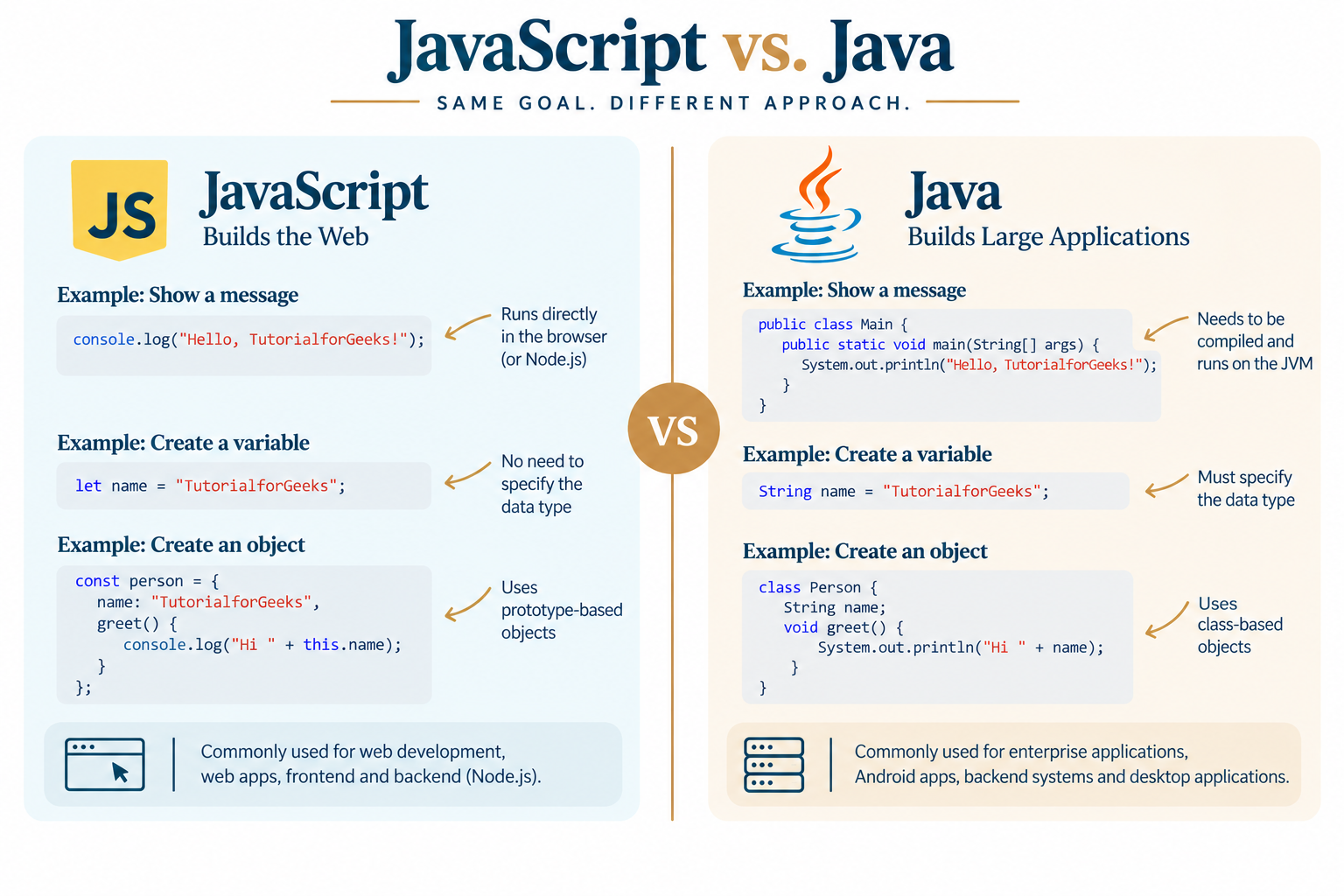
JavaScript and Java are two different programming languages with different purposes, syntax, and execution environments. The following table highlights their key differences at a glance.| Basis of Comparison | JavaScript | Java |
|---|---|---|
| Type of Language | Scripting and programming language | General-purpose programming language |
| Primary Use | Web development, interactive websites, web applications, and server-side development | Enterprise applications, Android development, backend systems, and desktop applications |
| Developed By | Brendan Eich | James Gosling and team at Sun Microsystems |
| First Released | 1995 | 1995 |
| Programming Paradigm | Multi-paradigm, including object-oriented, functional, and procedural programming | Primarily object-oriented, with support for other programming features |
| Typing | Dynamically typed | Statically typed |
| Compilation | Usually interpreted or JIT-compiled by JavaScript engines | Compiled to bytecode and executed by the Java Virtual Machine (JVM) |
| Runtime Environment | Browser or JavaScript runtime such as Node.js | Java Virtual Machine (JVM) |
| File Extension | .js | .java |
| Object Model | Prototype-based | Class-based |
| Platform Dependency | Highly portable across browsers and JavaScript runtimes | Platform-independent through the JVM |
| Web Browser Support | Directly supported by web browsers | Not directly executed in web browsers |
| Concurrency | Uses an event-driven model with an event loop; supports workers for parallel execution | Strong built-in support for multithreading |
| Memory Management | Automatic garbage collection | Automatic garbage collection |
| Common Frameworks | React, Angular, Vue.js, Node.js | Spring, Hibernate, Jakarta EE |
| Typical Applications | Websites, web apps, APIs, real-time applications | Enterprise software, backend systems, Android apps, large-scale applications |
| Learning Curve | Generally easier to start with, especially for web development | Often requires more concepts initially, such as classes, types, and JVM concepts |
| Code Execution | Executed by a JavaScript engine | Executed by the JVM after compilation to bytecode |
Common Uses of JavaScript
JavaScript is one of the most widely used programming languages, especially for building interactive and dynamic applications. It is used both in web browsers and on servers to create everything from simple website features to complete applications.
- Interactivity on the Web: Drives dropdown menus, sliders, pop-ups, and form validation on webpages.
- Client-side Frameworks: Serves as the basis of widely used client-side frameworks such as React, Angular, and Vue.js.
- Server-side Programming: Executes on the server through Node.js to construct APIs, manage databases, and process server logic.
- Mobile Application Development: Helps develop mobile applications using platforms such as React Native for both Android and iOS devices in one shot.
- Video Game Development: Drives games running in the browser using game libraries such as Phaser or HTML5 Canvas.
- Automation and Scripting: JavaScript can automate repetitive tasks, process data, interact with APIs, and perform various scripting tasks.
- Desktop Applications: Frameworks such as Electron allow developers to build desktop applications using JavaScript, HTML, and CSS.
Example: Changing Webpage Content Dynamically
document.getElementById("greeting").innerText = "Hello, welcome to JavaScript!";
Advantages of Learning JavaScript
JavaScript is a practical language to learn because it is used across many areas of modern software development. Once you understand the basics, you can use the same language to build websites, web applications, backend services, and even mobile and desktop applications.- Accessibility for Beginners: There is no need for specific software; a web browser and a text editor will suffice.
- Large Community: It is one of the largest communities of developers in the world, ensuring plenty of tutorials and support.
- Highly Demanded Skill: It consistently remains one of the highest-demand skills for web development jobs.
- Versatility: Just a single language is sufficient to develop for front-end, back-end, mobile apps, as well as desktop applications.
- Immediate Results: Code can be tested immediately using a browser console.
Example: Using the Browser Console
console.log("This message appears in the browser's developer console.");
Conclusion
Being a programming language that underlies the web, JavaScript can be used for creating anything from simple buttons with interactivity to a full-stack application. The fact that it is quite easy for beginners to start using this language and that this language is very popular in practice is a good reason to consider it the best choice for people who want to learn programming.
Frequently Asked Questions
1. Do I have to install anything in order to learn JavaScript?
No. JavaScript is a client-side programming language. This means that everything you will need to do in order to write your first lines of code is a text editor and an HTML file (or a web browser's developer console).
2. Is JavaScript and Java the same thing?
No. JavaScript and Java are completely different programming languages, despite the similar names.
3. Can JavaScript be used for something else apart from websites?
Yes. Using JavaScript together with Node.js, one can create server-side applications. With frameworks such as React Native or Electron, one can create mobile and desktop applications.
4. What is the difference between var, let, and const?
The former is an old-fashioned method of declaring a variable, with less restrictive scoping rules. Let allows you to create variables that can be changed later, whereas const is used for declaring values that are not going to be changed.
5. How much time does it take to learn JavaScript?
With enough effort, within several weeks one should learn the basics – variables, functions, loops, and DOM interactions. Mastering JavaScript takes a lot more time than just several weeks, of course.

0 Comments