If you are a developer, a learner, or even just a reader, you might have spent some time around AI or its related tools and must have come across the term 'MCP'. The idea behind it is quite simple, but it is replacing the traditional system of API's rapidly.
For years, APIs used to be the bridge connecting everything together, but now there's a new protocol rising steadily known as MCP, which is exactly what will be discussed in this guide.
Table of Contents
What is MCP?
MCP is an acronym that stands for Model Context Protocol, and it is the biggest shift since the API. Introduced by Anthropic, MCP is an open-source standard or set of rules (also known as a protocol) for connecting AI applications to external systems by letting the AI model ask for information or take action independently, which works universally regardless of which tools or AI models are present on the other end. Key Features of MCP
- Open-Source: MCP is free and open-source, which means any company or developer can implement it without permission or licensing fees.
- Client-Server Architecture: MCP comprises three components: hosts, clients, and servers. The AI application communicates with the server to fetch required data and tools
- Two-way Connections: MCP supports secure, two-way communication, so AI systems can both fetch or read data as well as take actions on external systems.
- Cross-Platform Adoption: MCP's are not limited to Claude just because Anthropic created it; big players, including OpenAI and Google DeepMind, have adopted it as well.
- Two-Way Communication: MCP isn't just the AI pulling data one-way; servers can also send updates back to the model as things change, keeping the AI's context updated.
Why Was MCP Created?
MCP was created to give AI models a standardized way to reach outside their own training data. It can reach real files, live databases, and actual tools, so they could act on current, relevant information instead of just generating answers from what they'd memorized.
| Problem |
Problem Before MCP |
How Does MCP Solve It? |
|---|---|---|
| Integration |
Every AI model needed a custom integration for every tool (the "N×M problem"). |
One protocol works across all compliant models and tools ("N+M" instead of "N×M"). |
| Real-World Connection |
AI Models were isolated from real-world data. |
MCP connects models to real systems where actual data lies. |
| Security |
No standard way to manage security and permissions for AI-tool access. |
MCP defines clear rules for hosts to approve and control what servers an AI can access. |
| Format |
No shared format. Each API had its own auth, structure, and quirks. |
Standardized message format (JSON-RPC 2.0) across all servers. |
| Data Freshness | AI models could only respond using what they'd memorized during training, with no way to check current, real-world information. | Gives models a live connection to external resources, pulling in current data at the moment it's actually needed. |
History of MCP
MCP is an open standard introduced by Anthropic in November 2024, which followed the given timeline during its development, as shown in the table.
| Year | Milestone Achieved |
|---|---|
| November 2024 | Anthropic introduces MCP as an open-source standard, built by engineers David Soria Parra and Justin Spahr-Summers, aimed at giving AI models a consistent way to connect to external tools and data. |
| Late 2024 | Early SDKs and reference servers were released (filesystem, GitHub, Slack, PostgreSQL), letting developers start building and testing MCP servers locally. |
| Early 2025 | Community adoption picks up, with developer tools like editors and IDEs that start integrating MCP support, and a growing list of third-party MCP servers appear for popular services. |
| March 2025 | OpenAI announces support for MCP in its Agents SDK and ChatGPT desktop app, marking the first major adoption outside Anthropic's own ecosystem. |
| Mid 2025 | Google DeepMind adopts MCP as well, signaling that the protocol is becoming a cross-industry standard rather than a single vendor's feature. |
| December 2025 | Anthropic donates MCP to the Agentic AI Foundation, a Linux Foundation project co-founded with Block and OpenAI — shifting MCP from company-owned to community-governed infrastructure. |
| 2026 | MCP continues expanding with wider tool ecosystems, remote server deployments, and deeper integration across major AI applications and development platforms. |
MCP vs Traditional APIs
For decades, APIs were the universal handshake between systems: one endpoint, one request, one response. LLMs break that model: they need to reach across multiple tools, connect them, and work with unstructured data, which calls for context, not just a single call. A traditional API is a one-to-one contract that requires a new integration for each tool and model, whereas MCP provides a shared language for every tool and model, allowing the AI itself to decide at runtime which tool to use and how.
|
Aspect |
API |
MCP |
|---|---|---|
|
Who Decides When to Call It? |
A developer, hard-coded in advance. |
The AI model, in real time, is based on the request. |
|
Integration Efforts |
One custom connector per app-tool pairing. |
One server works with any MCP-compatible model. |
|
Scaling Problem |
Grows as (models × tools). Every new pairing needs new code. |
Grows linearly; build a server once, and any model can use it. |
|
Format |
Varies by provider (REST, GraphQL, SOAP, custom keys). |
Standardized message format (JSON-RPC 2.0) across all servers. |
|
Relationship to Each Other |
Foundational; MCP servers often call APIs underneath. |
Sits on top of APIs, doesn't replace them. |
|
Discovery |
The developer reads documents and writes fixed calls. |
The model reads tool descriptions and chooses at runtime. |
|
What it Exposes? |
Endpoints defined by the service are exposed. |
Tools (actions), Resources (data), and Prompts (templates) are exposed. |
|
Best Analogy |
A locked door with its own unique key remains the best analogy. |
A universal doorway that any compatible key can open is the best analogy. |
|
Primary Consumer |
Human-written application code is the primary consumer. |
AI agents and models are the primary consumers. |
Comparison of MCP With USB-C
The comparison that comes up in almost every conversation regarding MCP is that of a USB-C.
- The Comparison: USB-C is the go-to analogy for explaining MCP in one line.
- The Old Problem: Every device once needed its own proprietary cable, just like every AI model once needed its own custom connector per tool.
- The Fix: USB-C standardized ports across devices; MCP standardizes connections across AI models and tools.
- The Result: Build one MCP server, and any MCP-compatible AI application can use it, no per-model connector needed.
- The Bigger Shift: Once a standard takes hold, builders stop patching one-off bridges and start building for the whole ecosystem.
Working and Architecture of MCP
MCP comprises three major roles working together
- Host application: The host is the AI application itself, such as a desktop chat app or code editor. Manages the overall system and decides which MCP servers are allowed to connect.
- MCP Client: Each Client lies inside the host, speaks the MCP protocol, and maintains a one-to-one connection with a single MCP server, handling two-way communication between them.
- MCP Server: A separate, lightweight program that exposes one specific capability, say, access to a file system, a wrapped REST API, or a database connection. The protocol deliberately keeps servers small and focused, with each one handling a well-defined set of functionality rather than trying to do everything at once.
- Request and Response Flow: When a user asks something, the host determines if external data is needed, the client sends a structured request to the relevant server, the server processes it and returns results, and the model uses that result to generate its final response.
- Transport Layer: MCP communicates using JSON-RPC 2.0 messages, sent either via stdio (for local tools running on the same machine) or HTTP with Server-Sent Events (for remote, cloud-hosted servers).
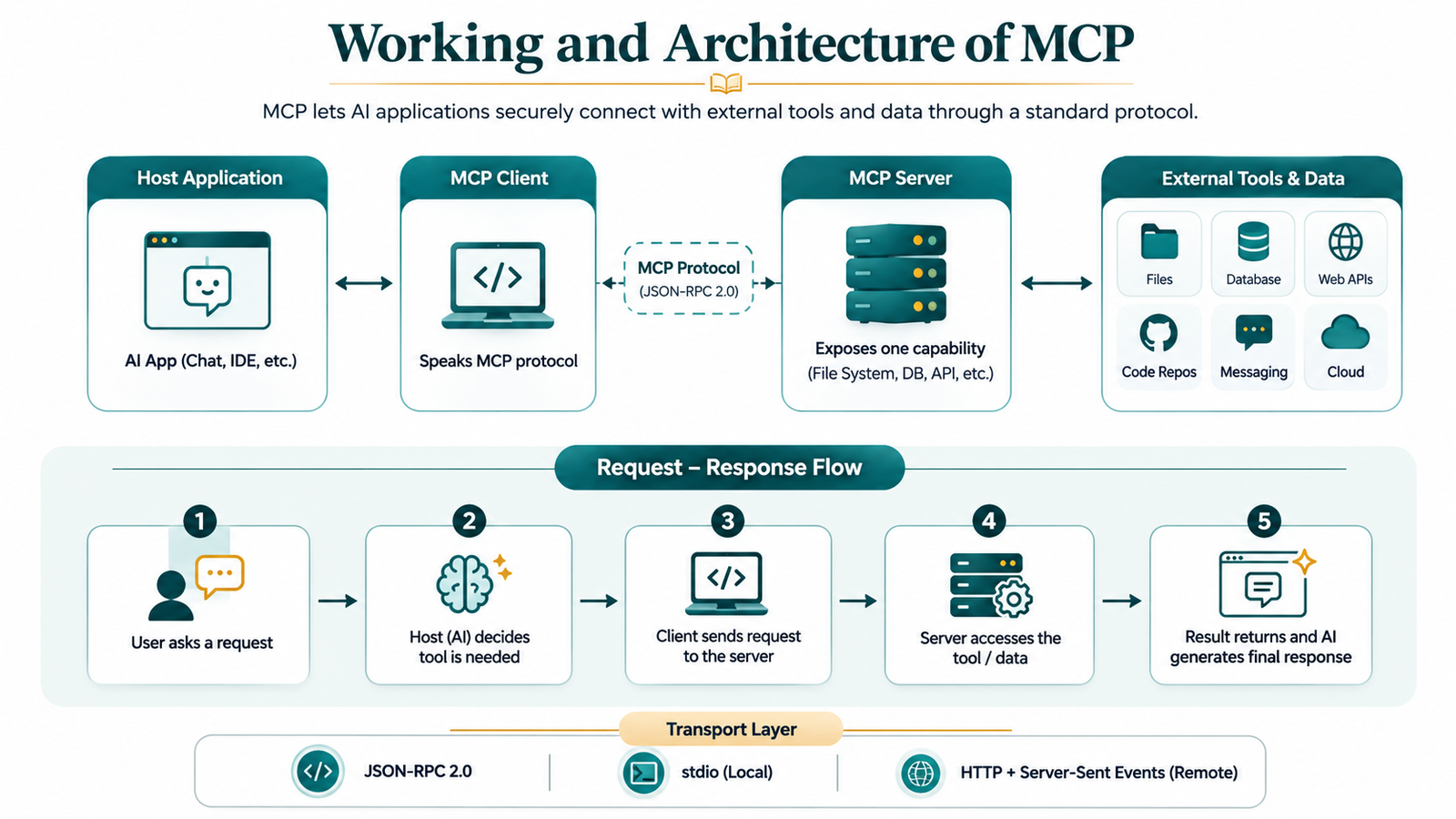
Core Components of MCP
- Host: The main AI application (e.g., Claude Desktop) that the user interacts with directly. It coordinates everything and enforces security boundaries.
- Client: A lightweight connector inside the host, dedicated to managing communication with one specific MCP server at a time.
- Server: A program that exposes tools, resources, or prompts related to a specific system, for example, a Postgres database or a Google Drive account.
The MCP server can expose three kinds of components to the model
- Tools: Functions that an AI model can invoke, for instance, querying a database, sending an email, etc.
- Resources: Data that a model can read, be it file contents, database records, API responses, etc. Resources are application-controlled, meaning the host or user decides when to pull them into context.
- Prompts: Reusable templates that the user explicitly triggers or invokes. These are like saved templates that can be used multiple times to perform the same function.
How Does Communication Occur?
- Common Language JSON-RPC: MCP uses JSON-RPC 2.0. This is a way to ask for something and get an answer back. So every server and every client uses the message format. This means that JSON-RPC is the language that everyone understands.
- MCP Has Three Layers: MCP is split into three parts: transport, session, and message layers. This keeps the movement of data separate from the actual messages. The transport layer is about how data moves. The session layer is about the conversation. The message layer is about what's being said.
- Two Ways To Move Data: If you are on the machine, MCP uses stdio to talk directly. This is like talking to someone in the room. If you are on machines or if you are using the cloud, MCP uses HTTP/SSE. This is like talking to someone in a room but still being able to hear each other.
- Importance: MCP uses JSON-RPC, which means that different applications can talk to the server. For example, a Claude-powered app and a GPT-powered app can talk to the server. They do not need code to do this. JSON-RPC is the language that makes this possible. This is why JSON-RPC is so important for MCP.
- Knowledge Requirement: You do not need to know all about JSON-RPC to use MCP. JSON-RPC runs in the background. Does its job. You can just use MCP without worrying about the details. MCP and JSON-RPC work together so that you can build and use applications easily.
Types of MCP Server
MCP servers differ based on where they run, what they expose, and who they're built for. Here's a quick breakdown of the main types.| Type | Description |
|---|---|
| Local Servers | Run on your own machine, communicating via stdio; ideal for beginners since there's no networking or deployment involved. |
| Remote Servers | Deployed over HTTP so multiple users or apps can access them at once; the standard shape for production use. |
| Reference Servers | Official examples released by Anthropic (filesystem, GitHub, Slack, PostgreSQL) are meant to teach proper server structure. |
| Community-Built Servers | Third-party servers built by developers for tools like Notion, Google Drive, and Docker, filling gaps that the official ones don't cover. |
| Data-Focused Servers | Expose mainly Resources, read access to files, records, or documents, without letting the AI take action. |
| Action-Focused Servers | Expose mainly Tools, functions the AI can invoke, like sending messages or updating records; need tighter permission control. |
| Enterprise / Internal Servers | Private servers built by organizations to connect AI tools to internal systems, secured for in-house use only. |
Benefits of MCP
- Reduced Integration Effort: Developers build against MCP once instead of writing a separate custom integration for every tool-model combination.
- More Relevant Responses: By connecting directly to live data, AI systems can answer using real, up-to-date information instead of relying only on training data.
- Stronger Security and Control: Hosts explicitly approve which servers an AI can access, giving organizations clear control over data exposure.
- More Scalable Ecosystem: A growing library of ready-made MCP servers (GitHub, Slack, databases, etc.) means developers can plug in existing connectors instead of building from scratch.
- Faster Development Cycles: Developers skip building custom integrations from scratch, so new AI-tool connections can go from idea to working feature in hours instead of weeks.
Conclusion
A thorough background in deep AI or machine learning isn't needed to work with MCPs. Python is a common starting point because it combines readable syntax with a large ecosystem of libraries, letting you prototype a server in a much shorter amount of time. MCP isn't about making AI models smarter on their own; it's about making them connected. It replaces the hassle of one-off, vendor-specific integrations with a single shared standard that any compliant model and any compliant tool can use to talk to each other. For a beginner, that means the effort you spend learning MCP today is effort that carries forward, no matter which AI model becomes dominant tomorrow. As more of the AI industry treats it as shared infrastructure rather than a single company's product, understanding MCP is quickly becoming as fundamental as understanding REST APIs was for the previous generation of web development.
Frequently Asked Questions
1. What language should I use to build my first MCP server?2. Is MCP only for Claude?Python is the most beginner-friendly choice, thanks to its simple syntax and mature ecosystem for APIs and automation.
3. Do I need to know machine learning to build an MCP server?No. It was built with Claude in mind, but OpenAI and Google DeepMind have both adopted it, and it works across many AI applications and developer tools.
No. Basic backend skills like Python, HTTP, and JSON handling are enough to build a working MCP server.4. What are LLMs?
An LLM (Large Language Model) is an AI system trained on massive amounts of text to predict and generate human-like language. Example- Chatgpt Ai, Claude Ai
5. Should I build a local or remote server first?
Start local. It's easier to build and test, and you can move to a remote, network-accessible server once you're comfortable

0 Comments