Table of Contents
What is a While Loop?
A while loop in Java is a control flow statement that repeatedly executes a block of code as long as the specified condition evaluates to true. The condition is checked at the beginning of every iteration, which is why the while loop is called an entry-controlled loop. If the condition is false right from the start, the loop body will never execute, not even once.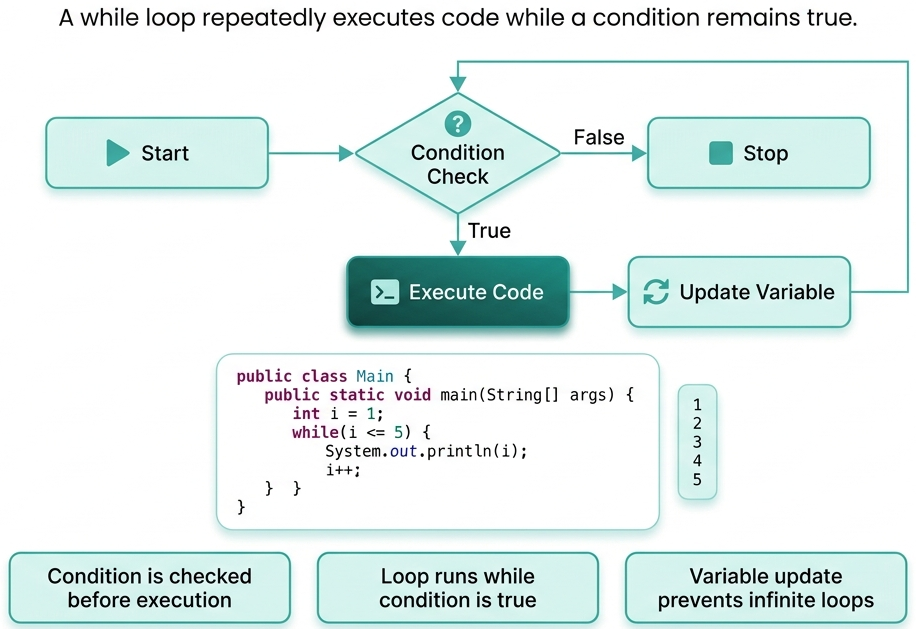
Syntax:
Example:while (condition) {
// body of loop
}
// Java program to implement
// while loop
public class TutorialforGeeks
{
    public static void main(String[] args)
    {
        int i = 1;

        while (i = 5)
        {
            System.out.println("Iteration number: " + i);
            i++;
        }
    }
}
Output:
Explanation:Iteration number: 1
Iteration number: 2
Iteration number: 3
Iteration number: 4
Iteration number: 5
- int i = 1: The loop variable i is declared and initialized before the loop starts.
- i = 5: The condition is checked before every iteration. As long as i is less than or equal to 5, the loop body executes.
- i++: Inside the loop body, i is incremented by 1 after every iteration.
- When i becomes 6, the condition i = 5 becomes false and the loop exits automatically.
- The output shows 5 lines, one printed for each iteration from 1 to 5
Key Features of While Loop
- Entry-Controlled Loop: The while loop checks its condition before executing the loop body. If the condition is false at the very beginning, the loop body is completely skipped. This gives the programmer full control over whether the loop should run at all.
- Unknown Number of Iterations: The while loop is the best choice when you do not know in advance how many times the loop needs to run. It continues executing as long as the condition remains true, making it ideal for input validation, reading data streams, and game loops.
- Condition Must Eventually Become False: For a while loop to work correctly, the condition inside it must eventually become false. If nothing inside the loop changes the condition, the loop will run forever, resulting in an infinite loop that freezes the program.
- Flexible Condition: The condition in a while loop can be any boolean expression — it can involve variables, method calls, comparisons, or logical combinations. This flexibility makes the while loop suitable for a wide range of real-world programming scenarios.
- No Built-in Update Expression: Unlike the for loop, the while loop does not have a built-in update expression. The programmer is responsible for updating the loop variable inside the loop body to ensure the condition eventually becomes false.
- Supports Break and Continue: Just like other loops in Java, the while loop supports the break statement to exit the loop immediately and the continue statement to skip the current iteration and jump back to the condition check.
Basic While Loop
The standard form of while loop where a counter variable controls how many times the loop runs.Example:
// Java program to implement
// while loop
public class TutorialforGeeks
{
    public static void main(String[] args)
    {
        System.out.println("Multiplication table of 5:");
        int i = 1;

        while (i = 10)
        {
            System.out.println("5 x " + i + " = " + (5 * i));
            i++;
        }
    }
}
Output:
Explanation:Multiplication table of 5:
5 x 1 = 5
5 x 2 = 10
5 x 3 = 15
5 x 4 = 20
5 x 5 = 25
5 x 6 = 30
5 x 7 = 35
5 x 8 = 40
5 x 9 = 45
5 x 10 = 50
- int i = 1 is declared before the loop since while loop has no built-in initialization section.
- The condition i = 10 is checked before each iteration.
- In every iteration, the multiplication of 5 with the current value of i is printed.
- i++ at the end of the loop body increments the counter after every iteration.
- When i becomes 11, the condition fails and the loop stops cleanly.
While Loop with User Input
A very practical real-world use, the loop keeps running until the user enters a valid expected value.Example:
// Java program to implement
// while loop with user input
import java.util.Scanner;

public class TutorialforGeeks
{
    public static void main(String[] args)
    {
        Scanner sc = new Scanner(System.in);
        int num = 0;

        while (num = 0)
        {
            System.out.print("Enter a positive number: ");
            num = sc.nextInt();
            if (num = 0)
            {
                System.out.println("Invalid input. Please try again.");
            }
        }
        System.out.println("You entered: " + num);
        sc.close();
    }
}
Output:
Explanation:Enter a positive number: -2
Invalid input. Please try again.
Enter a positive number: 3
You entered: 3
- num is initialized to 0 so the while condition num = 0 is true from the start, allowing the loop to enter.
- Inside the loop, the user is asked to enter a number using Scanner.
- If the entered number is still less than or equal to 0, an error message is shown and the loop repeats.
- The loop continues until the user enters a valid positive number.
- Once a valid number is entered, the condition becomes false, the loop exits, and the valid value is printed.
Infinite While Loop
When the condition is always true, the loop runs indefinitely. A break statement is used to exit when a specific condition inside the loop is met.Example:
// Java program to implement
// infinite while loop
public class TutorialforGeeks
{
    public static void main(String[] args)
    {
        int count = 0;
        while (true)
        {
            System.out.println("Count is: " + count);

            count++;

            if (count == 5) {

                System.out.println("Limit reached. Exiting loop.");

                break;

            }
        }

    }

}
Output:
Explanation:Count is: 0
Count is: 1
Count is: 2
Count is: 3
Count is: 4
Limit reached. Exiting loop.
- while (true) creates an infinite loop because the condition never becomes false on its own.
- Inside the loop, the current value of count is printed and then incremented by 1.
- The if statement checks whether count has reached 5.
- When count == 5, a message is printed and the break statement immediately exits the loop.
- Without the break, this loop would run forever and the program would never terminate.
While Loop with Break and Continue
While loop with Break and Continue break exits the loop entirely and continue skips the current iteration and jumps back to the condition check.Example:
// Java program to implement while loop
// with break and continue statement
public class TutorialforGeeks
{
    public static void main(String[] args)
    {
        int i = 0;
        while (i  10)
        {
            i++;

            if (i == 4)
            {
                System.out.println("Skipping number: " + i);
                continue;
            }

            if (i == 8)
            {
                System.out.println("Breaking at number: " + i);
                break;
            }
            System.out.println("Current number: " + i);
        }
    }
}
Output:
Explanation:Current number: 1
Current number: 2
Current number: 3
Skipping number: 4
Current number: 5
Current number: 6
Current number: 7
Breaking at number: 8
- The loop starts with i = 0 and the condition i 10 allows it to run up to 9.
- i++ is placed at the very top of the loop body so the value updates before any check.
- When i == 4, the continue statement is triggered — it skips the print statement below and goes back to the condition check, so 4 is never printed as a current number.
- When i == 8, the break statement is triggered — it immediately exits the loop, so numbers 8, 9, and 10 are never printed.
- This example clearly shows how break and continue give fine-grained control over loop execution.
How While Loop Works?
- Condition Evaluated: Before anything else the condition inside the while() is evaluated. If it returns true, execution moves into the loop body. If it returns false, the loop is skipped entirely.
- Loop Body Executes: When the condition is true, all the statements inside the loop body are executed one by one, from top to bottom.
- Update the Variable: At some point inside the loop body, the variable that affects the condition must be updated. Without this step, the condition will never change and the loop will become infinite.
- Return to Condition Check: After the loop body finishes executing, control goes back to the condition. The condition is evaluated again with the updated variable value.
- Loop Exits: When the condition finally evaluates to false, the loop stops and the program continues with the next statement after the while block.
Conclusion
The while loop is one of the most practical and widely used looping constructs in Java. It is especially powerful in situations where the number of repetitions is not known ahead of time and the loop must continue based on a dynamic condition. Whether you are reading user input, processing data from a file, building a game loop, or waiting for a network response, the while loop handles all of these scenarios naturally. The key to using it correctly is making sure the condition will eventually become false; otherwise, the program gets stuck in an infinite loop. Once you understand how the while loop works alongside the for loop and do-while loop, you gain full control over repetition and flow in your Java programs.Frequently Asked Questions
1. Can a while loop be used to traverse an array in Java?2. What is the role of a flag variable in a while loop?Yes, a while loop can traverse an array using an index variable that increments with each iteration until it reaches the array length.
3. Can we use a while loop inside a switch statement in Java?A flag variable is a boolean that controls the while loop condition and is set to false when a specific event or result is achieved inside the loop.
4. What is the difference between while(true) and while(1) in Java?Yes, a while loop can be placed inside any case block of a switch statement and will execute normally as long as its condition remains true.
5. Does the while loop support multiple update statements inside the body?Java does not accept while(1) because Java requires a strict boolean condition, only while(true) is valid for writing an intentional infinite loop.
Yes, you can write as many update statements as needed inside the while loop body since Java places no restriction on what the body contains.

7 Comments