A while loop in Python is a control flow statement that repeatedly executes a block of code as long as a specified condition is True. It is commonly used when the number of iterations is not known in advance, and the loop should continue until a particular condition becomes False.
Unlike a for loop, which iterates over a sequence of elements, a while loop is based on a condition. Before each iteration, Python checks the condition. If it evaluates to True, the loop executes the code inside it. If the condition becomes False, the loop stops automatically.
The while loop is useful for solving problems where repetition depends on a condition rather than a fixed number of iterations.
Table of Contents
Why Use a while Loop?
A while loop is useful when you want to repeat a task until a specific condition becomes False. It is especially helpful when you do not know in advance how many times the loop should execute.- Executes Code Based on a Condition: A while loop keeps executing as long as the specified condition is True. This makes it suitable for condition-based repetition.
- Useful When the Number of Iterations is Unknown: If you don't know how many times a task needs to be repeated, a while loop is a better choice than a for loop.
- Reduces Repetitive Code: Instead of writing the same statements multiple times, a while loop repeats them automatically until the condition becomes False.
- Makes Programs More Flexible: Since the loop depends on a condition, it can handle different situations without changing the code structure.
- Improves Code Readability and Maintainability: Using a while loop makes programs cleaner, easier to understand, and simpler to modify in the future.
Syntax of the while Loop
The basic syntax of a while loop is:while condition:
# Block of code
Here,
- while: Starts the loop.
- condition: A Boolean expression that is checked before every iteration.
- : Marks the beginning of the loop body.
- Indentation: The statements inside the loop must be properly indented.
- Condition Update: The variable used in the condition should be updated to avoid an infinite loop.
How while Loop Works?
The while loop checks its condition before every iteration. If the condition is True, the statements inside the loop are executed. After executing the loop body, Python checks the condition again. This process continues until the condition becomes False.Example:
# Python program to understand how a while loop works
counter = 1
# Running the loop while counter is less than or equal to 4
while counter <= 4:
print("Counter:", counter)
# Increasing the counter value
counter += 1
Output:
Counter: 1Explanation:
Counter: 2
Counter: 3
Counter: 4
- The variable counter is initialized with the value 1.
- Python checks the condition counter <= 4.
- Since the condition is True, the statements inside the loop are executed.
- The value of counter is increased by 1.
- Python checks the condition again.
- The loop continues until counter becomes 5.
- When the condition becomes False, the loop ends automatically.
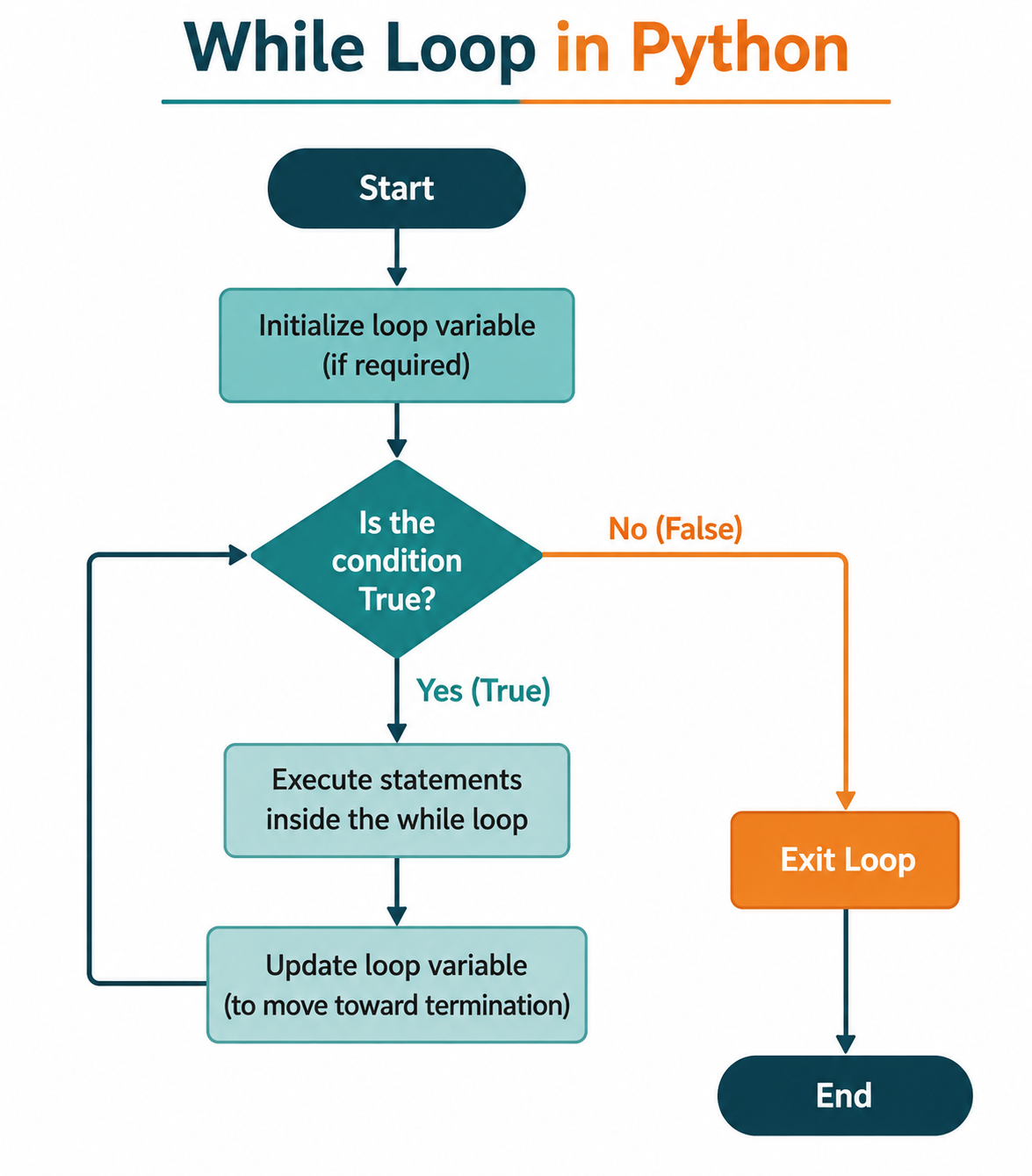
Flowchart of the while Loop
The following steps explain the flow of a while loop:- Start the Program: The flowchart begins at the Start symbol. The program then moves to the statements required before the while loop begins.
- Initialize the Loop Variable: If the loop condition depends on a variable, that variable is initialized before entering the loop. This step may not be necessary for every while loop.
- Check the Condition: Python checks whether the condition in the while statement is True or False.
- Execute the Loop Body When the Condition Is True: If the condition is True, Python executes the statements inside the while loop.
- Update the Loop Variable: After executing the loop body, the loop-control variable is updated when necessary. This update should move the condition toward becoming False.
- Return to the Condition: After updating the variable, the program returns to the condition and checks it again. This cycle continues as long as the condition remains True.
- Exit the Loop When the Condition Is False: When the condition becomes False, Python skips the loop body and exits the while loop.
- Continue with the Program: After the loop ends, the program continues with the next statement after the while loop or reaches the End of the program.
Using the while Loop with Conditions
The while loop executes a block of code repeatedly as long as the specified condition is True. Before every iteration, Python checks the condition. If it evaluates to True, the loop continues. If it becomes False, the loop terminates.A while loop is useful when the number of iterations depends on a condition rather than a fixed sequence of elements.
Example:
# Python program to use a while loop with a condition
number = 1
# Running the loop while the condition is True
while number <= 5:
print("Number:", number)
# Increasing the value of number
number += 1
Output:
Number: 1Explanation:
Number: 2
Number: 3
Number: 4
Number: 5
- The variable number is initialized with the value 1.
- The condition number <= 5 is checked before every iteration.
- Since the condition is True, the value of number is printed.
- After printing, the value of number is increased by 1.
- The loop continues until number becomes 6.
- At this point, the condition becomes False, and the loop stops automatically.
Using Different Conditions in a while Loop
The condition of a while loop is not limited to numbers. It can use comparison operators, logical operators, or Boolean variables.Example:
# Python program to use a Boolean variable in a while loop
is_running = True
count = 1
# Running the loop while is_running is True
while is_running:
print("Iteration:", count)
# Increasing the count
count += 1
# Stopping the loop after 3 iterations
if count > 3:
is_running = False
Output:
Iteration: 1Explanation:
Iteration: 2
Iteration: 3
- The Boolean variable is_running is initially set to True.
- The loop executes because the condition is True.
- During each iteration, the value of count is increased.
- When count becomes greater than 3, is_running is changed to False.
- Since the condition is now False, the loop terminates.
Infinite while Loops
An infinite while loop is a loop that never stops because its condition always remains True. This usually happens when the condition is never updated or is intentionally kept True.Infinite loops are sometimes useful in applications such as game loops, servers, or programs that continuously wait for user input. However, beginners often create them accidentally by forgetting to update the loop variable.
Example of an Infinite while Loop:
# Python program demonstrating an infinite while loop
while True:
print("This loop will run forever.")
Output:
This loop will run forever.Note:
This loop will run forever.
This loop will run forever.
The program will continue printing the message until it is stopped manually.Explanation:
- The condition True never changes.
- Since the condition always evaluates to True, the loop never terminates.
- The program continues executing indefinitely until it is interrupted.
Example: Wrong way to create a while loop
# Python program with an accidental infinite loop
count = 1
while count <= 5:
print(count)
Explanation:
The value of count is never increased, so the condition count <= 5 always remains True. As a result, the loop runs forever.
Correct Example:
# Python program to avoid an infinite loop
count = 1
while count <= 5:
print(count)
# Updating the loop variable
count += 1
Output:
1Explanation:
2
3
4
5
- The loop starts with count = 1.
- After each iteration, count is increased by 1.
- When count becomes 6, the condition count <= 5 becomes False.
- The loop stops successfully.
How to Avoid Infinite while Loops?
Follow these ways to prevent accidental infinite loops:- Update the Loop Variable: Always update the loop-control variable inside the loop if the condition depends on it. Otherwise, the condition may never change.
- Ensure the Condition Can Become False: Check that the loop condition can eventually become False. This ensures that the loop has a clear stopping point.
- Test with Small Values: Test your loop using small values before working with larger inputs. This makes it easier to identify logical errors.
- Use break When Appropriate: Use the break statement when the loop needs to exit after a specific condition is met, especially in intentionally infinite loops such as while True.
- Check the Loop Condition Carefully: Review the loop condition and its related variables to make sure they behave as expected throughout every iteration.
# Python program to demonstrate the use of a while loop
# Initializing the variable
number = 1
# Running the loop while the condition is True
while number <= 5:
print("Number:", number)
# Increasing the value of number
number += 1
Output:
Number: 1
Number: 2
Number: 3
Number: 4
Number: 5
Explanation:
- number = 1: A variable named number is initialized with the value 1. It is used as the loop control variable.
- while number <= 5: The while loop checks whether the condition number <= 5 is True. If it is, the loop executes the statements inside it.
- print("Number:", number): The print() statement displays the current value of number during each iteration.
- number += 1: The value of number is increased by 1. This update is important because it helps the loop move toward the stopping condition.
Common Mistakes to Avoid
1. Forgetting to Update the Loop Variable: If the loop variable is not updated, the condition may always remain True, causing an infinite loop.Wrong:2. Forgetting the Colon (:): The while statement must always end with a colon (:).
count = 1
while count <= 5:
print(count)
Correct:
count = 1
while count <= 5:
print(count)
# Updating the loop variable
count += 1
Wrong:3. Incorrect Indentation: Python uses indentation to identify the statements inside the loop.
count = 1
while count <= 5
print(count)
Correct:
count = 1
while count <= 5:
print(count)
Wrong:4. Writing an Incorrect Condition: An incorrect condition may prevent the loop from executing or may create an infinite loop.
count = 1
while count <= 5:
print(count)
count += 1
Correct:
count = 1
while count <= 5:
print(count)
count += 1
Wrong:5. Using Assignment (=) Instead of Comparison (==): Some beginners accidentally use the assignment operator instead of a comparison operator while writing conditions.
count = 10
while count <= 5:
print(count)
count += 1
Correct:
count = 1
while count <= 5:
print(count)
count += 1
Wrong:
# This will produce a syntax error
count = 1
while count = 5:
print(count)
Correct:
count = 5
while count == 5:
print(count)
break
Conclusion
The while loop is one of the fundamental looping statements in Python. It allows you to execute a block of code repeatedly as long as a specified condition remains True. Unlike the for loop, which is commonly used for iterating over sequences, the while loop is ideal when the number of iterations is unknown and depends on a condition.By learning the syntax, working mechanism, and common mistakes associated with the while loop, you can write more efficient and flexible Python programs. As you continue your Python journey, you will often combine while loops with conditional statements, logical operators, and loop control statements such as break and continue to solve a wide variety of programming problems.
Frequently Asked Questions (FAQs)
1. What is a while loop in Python?A while loop is a control flow statement that repeatedly executes a block of code as long as a specified condition remains True.2. When should I use a while loop?
A while loop is useful when the number of iterations is not known beforehand and the loop should continue until a condition becomes False.3. What is the difference between a for loop and a while loop?
A for loop is generally used to iterate over a sequence or when the number of iterations is known. A while loop is used when repetition depends on a condition rather than a fixed number of iterations.4. Can a while loop run forever?
Yes. If the loop condition always remains True or the loop variable is never updated, the loop becomes an infinite loop.5. How can I stop a while loop?
A while loop stops automatically when its condition becomes False. You can also terminate it immediately using the break statement.6. Can I use logical operators in a while loop condition?
Yes. You can use logical operators such as and, or, and not to create more complex conditions.

0 Comments