The programming language that makes webpages interactive is called JavaScript. Although HTML is responsible for making the webpage, and CSS for its presentation, the interaction on the webpage- for example, drop-down menus, searching and validating forms, and instant updates of the like button- is achieved through JavaScript. However, the simple interaction of JavaScript is supported by a rather sophisticated system comprising engines, memory, execution context, and event loop.
This tutorial will give you an insight into the way JavaScript functions. Each step will be explained simply using easy-to-understand language and code. You do not require any previous programming knowledge to be able to understand JavaScript fully.
Table of Contents
What Is JavaScript?
JavaScript is a lightweight, high-level scripting language. In other words, there is no need to translate your code into machine code, as the interpreter will do that automatically as you work.1. Client and Server: When it first appeared, JavaScript could be run in web browsers only (the "client side"). With technologies like Node.js, it can now also be used on the server side, providing a single programming language solution for both front-end and back-end development.
2. Dynamic Typing: Another important characteristic of JavaScript is dynamic typing. It implies that it is not necessary to declare the type of data that is stored in a particular variable because it can contain numbers and strings simultaneously.
Example of Dynamic Typing:
3. Language Interpretation: While programming languages like C++ require full compilation before execution, JavaScript programs are read and interpreted line by line by the JavaScript engine within the web browser. Modern JavaScript engines even have just-in-time compilation capabilities to increase performance.let value = 10; // value is a number
value = "Hello"; // now value is a string; this is allowed
4. Cross-Browser Capability: Every modern web browser (Chrome, Firefox, Safari, Edge) comes equipped with a JavaScript engine, allowing JavaScript programs to be executed without additional installations on virtually any device.
How Does the JavaScript Engine Work?
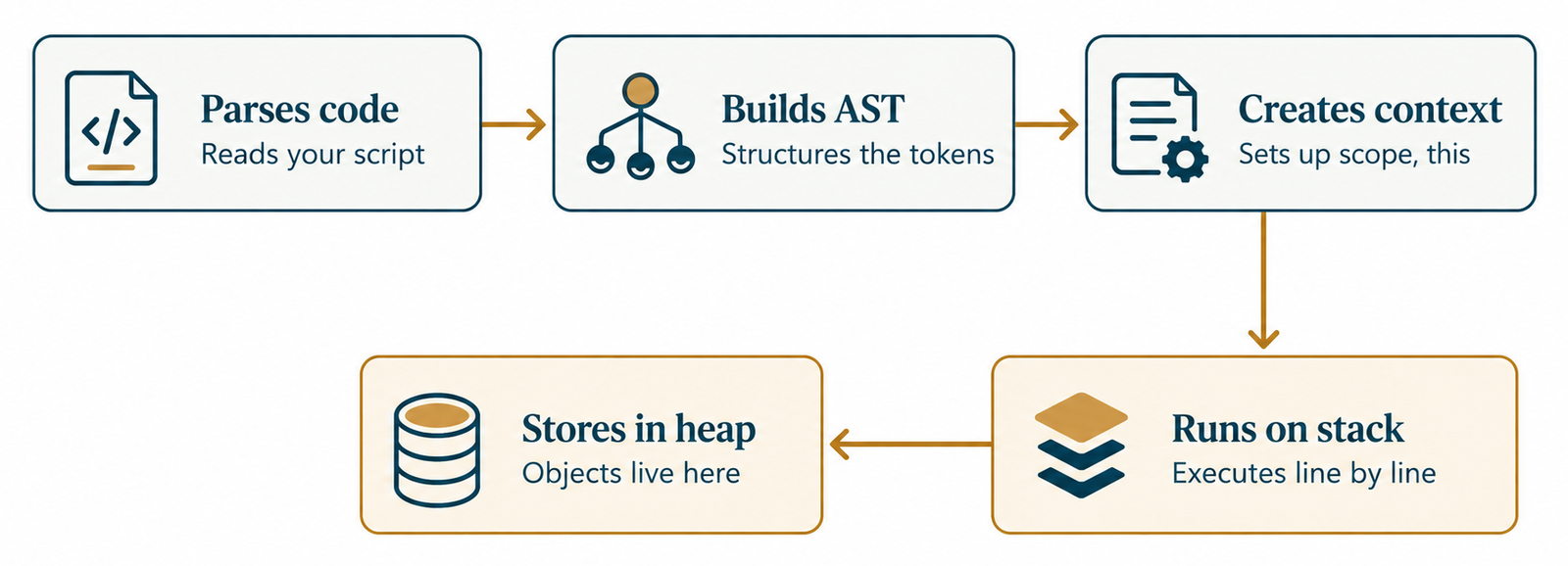
1. Code Parsing: First, the engine parses your code; that is, breaks the code down into tokens and builds an abstract syntax tree (AST).2. Compiling: Modern engines such as V8 from Google compile the code just in time using just-in-time technology to balance speed and flexibility by compiling the code into machine code right before execution.
3. Execution Context: Before executing the code, the engine creates the so-called execution context – an environment where variables, functions, and this will be stored. First of all, a Global Execution Context is created, and every time a function is executed, a new execution context is created.
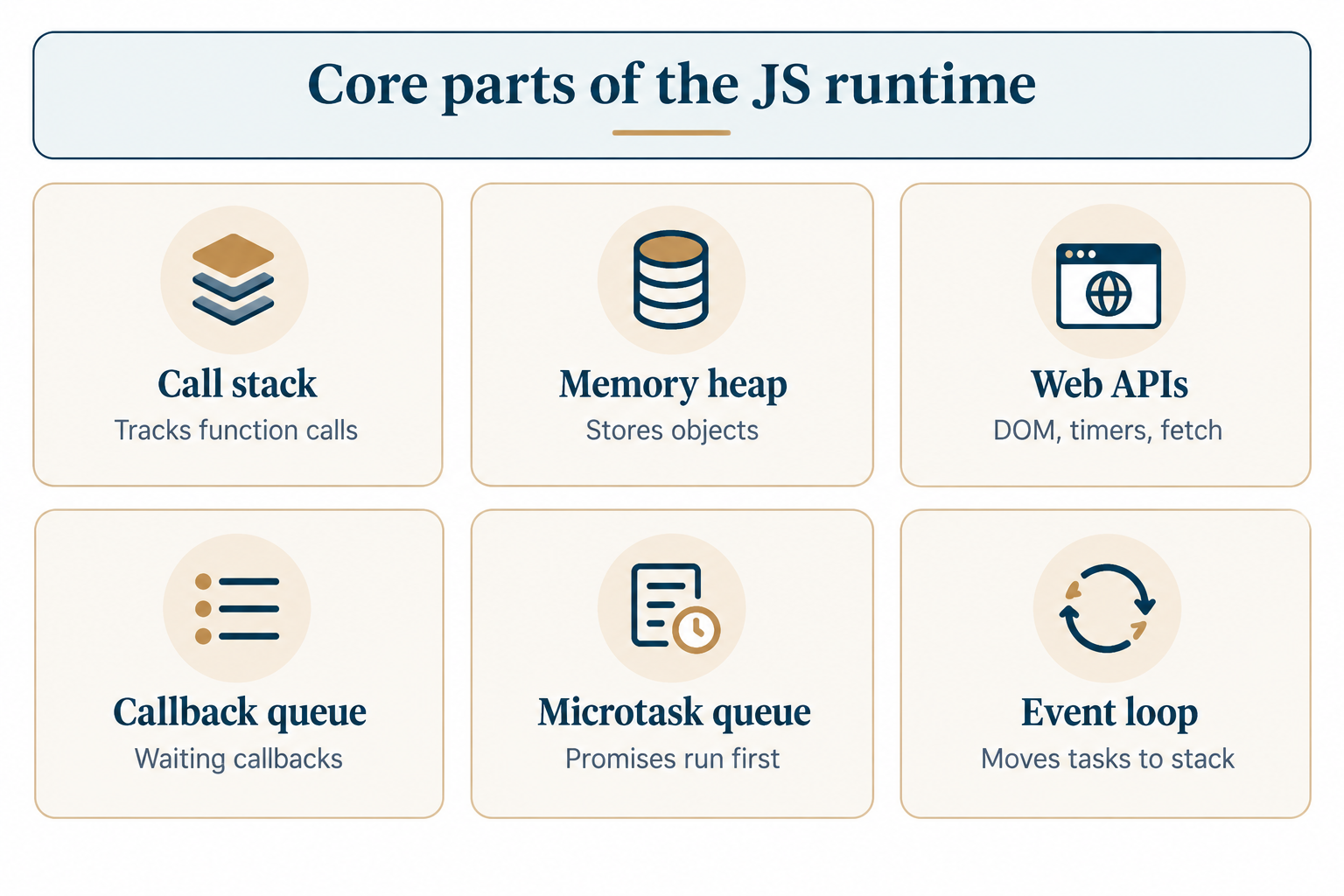
4. Call Stack: The call stack holds information about which function is being executed right now. The function being executed is added to the stack; the finished function is taken out of it.
function greet() {
sayHello();
}
function sayHello() {
console.log("Hello!");
}greet(); // greet() is pushed, then sayHello() is pushed, then both pop off
5. Memory Heap: The memory heap is another part of the JavaScript execution that works together with the call stack to store the objects, arrays, and functions in the running program.
Variables And Data Types
Variable Declaration
You may declare a variable by using 'var', 'let', or 'const '. Both let and const are new and preferable, whereas var is old-fashioned and different in the way it handles scope.
let age = 25;
const name = "Riya";
Primitive Types: JavaScript provides simple data types called primitives: string, number, boolean, undefined, null, symbol, and bigint. Primitives contain a single value and are passed by value during assignment.
Reference Types: Objects, arrays, and functions are examples of reference types. Rather than creating a copy of the value itself, a variable that holds an object contains just a reference to an object stored somewhere else in memory.
let user = { name: "Aman" };
let admin = user; // admin points to the same object
admin.name = "Neha";
console.log(user.name); // "Neha" — because both point to the same data
Type Conversion: JavaScript makes automatic conversion between data types, which may produce surprising effects if used carelessly.
console.log("5" + 1); // "51" (number becomes a string)
console.log("5" - 1); // 4 (string becomes a number)
Equality: Use === (strict equality) rather than == (loose equality), because in addition to comparing the values, it verifies the type as well.
console.log(5 === "5"); // false
console.log(5 == "5"); // true (not recommended)
Functions And Scope
Function Declaration: A function is a piece of code that is reusable. It can be declared using the function keyword and invoked using its name at any point.
function add(a, b) {
return a + b;
}
console.log(add(2, 3)); // 5
Arrow Functions: Arrow functions were introduced in ES6. The syntax is shorter and does not bind its own this, so it is more often used for shorter and simpler functions.
Lexical Scopes: Scope defines the places where a variable can be accessed. JavaScript uses lexical (or static) scoping, which means that a function can access variables in the place of its definition, not in the place of calling.const add = (a, b) => a + b;
console.log(add(4, 5)); // 9
Closures: A closure occurs when an inner function has access to variables declared in the outer function, even after the execution of the outer function has completed.
function outer() {
let count = 0;
return function inner() {
count++;
return count;
};
}
const counter = outer();
console.log(counter()); // 1
console.log(counter()); // 2
Hoisting: Hoisting is the process of moving the declaration of functions and variables to the top of their scopes. The declaration of var is hoisted along with its initialization with a value of undefined
Asynchronous JavaScript
1. Single Threading: JavaScript works using a single-threading approach, which implies that only one task can be done at once. For this reason, JavaScript requires some special tools for doing things such as making data requests while still keeping the whole web page from freezing up.2. Callbacks: Callbacks refer to functions that are passed into another function as parameters to be executed later.
setTimeout(() => {
  console.log("This runs after 2 seconds");
}, 2000);
3. Promises Fundamentals: A promise is a value that is not available currently but is going to become available in the future, and it may get resolved (Success) or rejected (Failure). Promises make asynchronous code easier to understand than callback functions.
const fetchData = new Promise((resolve, reject) => {
  resolve("Data loaded!");
});
fetchData.then((result) => console.log(result));
4. Async/Await: Async and await are contemporary keywords that enable one to write code that behaves asynchronously, but it appears and looks like normal or synchronous code.
async function getData() {
  let result = await fetchData;
  console.log(result);
}
getData();
5. Event Loop: This is where JavaScript is able to deal with asynchronous tasks because it is a single-threaded language. It constantly checks if there are any empty stacks, and if so, it then moves the tasks that are queued (e.g., a timer that has just finished) into the call stack for execution.
JavaScript And The DOM
1. DOM Tree: Document Object Model (DOM) is an arrangement of your web page in a tree form, which can be accessed by JavaScript and changed as well. All HTML tags get converted into nodes within this DOM tree.2. Element Selection: There are different ways for JavaScript to access the particular elements of the page.
const heading = document.querySelector("h1");
3. Event Listeners: An event listener is used by the code to listen for user events such as clicking the mouse, pressing keys, or form submissions.
const button = document.querySelector("button");
button.addEventListener("click", () => {
  alert("Button was clicked!");
});
4. Altering the Element Content: After an element has been chosen, JavaScript can alter its content in terms of text, appearance, or properties, thereby creating interactive Web pages.
heading.textContent = "Welcome!";
heading.style.color = "blue";
5. Browser Rendering: When JavaScript modifies the DOM, the browser will recompute the layout of the webpage and repaint the changed area; that’s the reason that too much DOM manipulation in a short period of time may reduce the speed of the page.
JavaScript Beyond The Browser
1. Node.js Runtime: It is an environment where you can execute your JavaScript code outside the browser, directly on your local machine or even on the server, via the V8 engine used in Chrome.2. NPM Packages: It has a package manager known as NPM (Node Package Manager), which is a large library consisting of free and reusable code packages.
3. Server-Side Code: The use of Node.js means that JavaScript can be used to do things such as database management, user authentication, and even web page serving that would usually require other server-side coding languages.npm install express
4. File System Access: Node.js is different from browser JavaScript because it is able to interact directly with the file system on a computer.
const fs = require('fs');
fs.writeFileSync('note.txt', 'Hello from Node!');
5. Creating APIs: API stands for application programming interface, which is made using technologies such as Node.js. This technology is usually used alongside other frameworks, including Express, to create an API.
Conclusion
While JavaScript might seem like a very simple scripting language at first glance, beneath its seemingly simplistic nature lies a structured system consisting of a compiler that parses and runs your code, a call stack that keeps track of function calls, a memory heap where data is stored, and an event loop that handles asynchronous operations while not stopping the browser from functioning. After you learn these components - including variables, functions, scope, the DOM, and asynchronous operations - learning the rest of JavaScript becomes a lot easier. Whether you're creating a simple click-to-color-change effect or a whole server using Node.js, all of the concepts introduced here form the basis for everything else.
Frequently Asked Questions
1. Is JavaScript the same as Java?
No. Despite the similar name, JavaScript and Java are completely different languages with different syntax, purposes, and design. The name "JavaScript" was largely a marketing decision made in the 1990s.
2. Do I need to install anything to start using JavaScript?
No installation is required to start; any modern web browser has a built-in JavaScript engine. You can open your browser's developer console and start writing code immediately. To build larger projects or use Node.js, you would install Node.js separately.
3. Why does JavaScript sometimes behave unpredictably with comparisons?
This usually happens due to type coercion, where JavaScript automatically converts values between types during comparison. Using strict equality (===) instead of loose equality (==) avoids most of these surprises.
4. What's the difference between synchronous and asynchronous code?
Synchronous code runs one line after another, waiting for each line to finish before moving on. Asynchronous code allows tasks (like fetching data) to run in the background, so the rest of the program isn't blocked while waiting.
5. Can JavaScript run without a browser?
Yes. Using Node.js, JavaScript can run directly on a computer or server, outside of any browser, which is how it's used to build back-end applications, command-line tools, and APIs.

0 Comments